TL;DR
Craft Innovations’ UX analysis of Revolut’s AIR assistant reveals that while conversational AI reduces friction for feature discovery and complex workflows like eSIM purchases, standard app navigation remains faster for everyday banking. Although AIR offers strong context retention, it largely functions as an instructional guide rather than an execution engine and occasionally struggles with recipient discovery and complete data retrieval.
Conversational Banking with Revolut AIR
On April 9, 2026, Revolut launched AIR (AI by Revolut), an in-app AI assistant designed to help users manage money through conversation. Instead of jumping between dashboards, card settings, analytics screens, and subscription menus, users can simply ask a question or describe what they want to do.
At launch, Revolut positioned AIR around several core scenarios:
- analyzing spending habits and budgets
- managing cards and account settings
- handling subscriptions and recurring payments
- supporting travel-related tasks, including eSIM purchases
- accessing investment and portfolio information
- assisting with payments and transfers
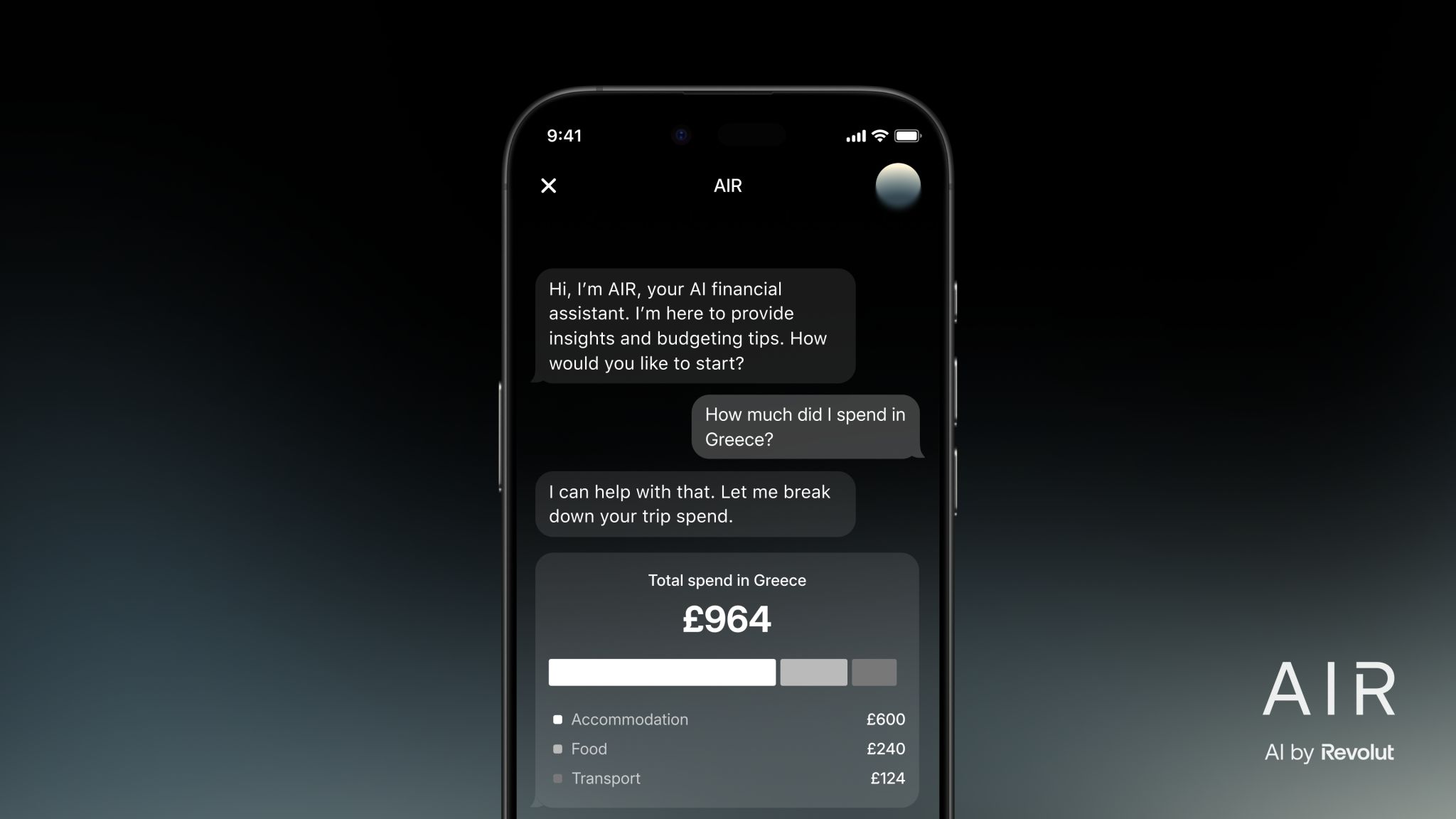
For fintech UX, this is a meaningful shift. Most banking apps have spent the last few decades optimizing navigation: cleaner dashboards, better tab bars, smarter categorization, more personalized widgets, and fewer steps to complete common tasks. AIR suggests a different direction. It’s one of the first large-scale attempts to turn AI into a primary banking interface.
What if users no longer need to remember where a feature lives? What if the interface becomes conversational, and the user can simply describe the outcome they want?
As a UX/CX research and innovation design agency – primarily focused on fintech – Craft Innovations could not stay on the sidelines. We conducted moderated usability testing and an expert UX review of AIR to understand not only what the assistant claims to do but how well it performs when users interact with it in realistic scenarios.
Our research has already gained traction across the European banking sector: Crédit Agricole cited Craft Innovations’ findings and test scenarios as a primary benchmark in their report on AI transparency in fintech.
For the Сore UX Analysis, we followed the same use cases Revolut highlights publicly:
- Spending Analytics and Budgeting
- Card and Account Management
- Subscriptions and Recurring Payments
- Context Retention & Security Awareness
- Travel and Lifestyle
- Investments and Portfolio
- Payments and Transfers
But as we product development teams know, AI features are rarely tested by pre-defined instructions – they’re tested when users go off-script.
That’s why the second part of our research focuses on Exploratory Use Cases – scenarios designed to push AIR beyond its advertised capabilities and evaluate its flexibility, safety mechanisms, and execution logic.
The full report additionally covers:
- conversational language and typo handling
- security and biometric-related actions
- complex multi-intent requests
- supporting multiple languages
- multi-banking and external ecosystem questions
- investment advice attempts
- humor and informal language
- attachment handling
- voice commands
1. Spending Analytics and Budgeting
Before evaluating AIR’s financial capabilities, it is worth understanding how users access the assistant and interact with it. AIR can be reached through Home → Account → Chats → AIR, placing it within Revolut’s existing communication ecosystem rather than as a standalone feature on the main dashboard.
The interface follows a familiar AI assistant pattern, combining suggested prompts, a conversational chat thread, text input, voice input, and attachment support.
One design choice deserves particular attention: AIR operates as a single persistent conversation. Whether users return minutes, days, or weeks later, all interactions remain in the same chat history. At the time of testing, there was no option to start a new conversation or separate topics into individual threads. While this allows AIR to retain context across interactions, it may also create challenges when users want to reset the discussion, switch to a completely different task, or clearly separate unrelated financial topics.

1.1 Category Breakdown & Percentages
One of the first scenarios we tested was spending categorization.
When asked:
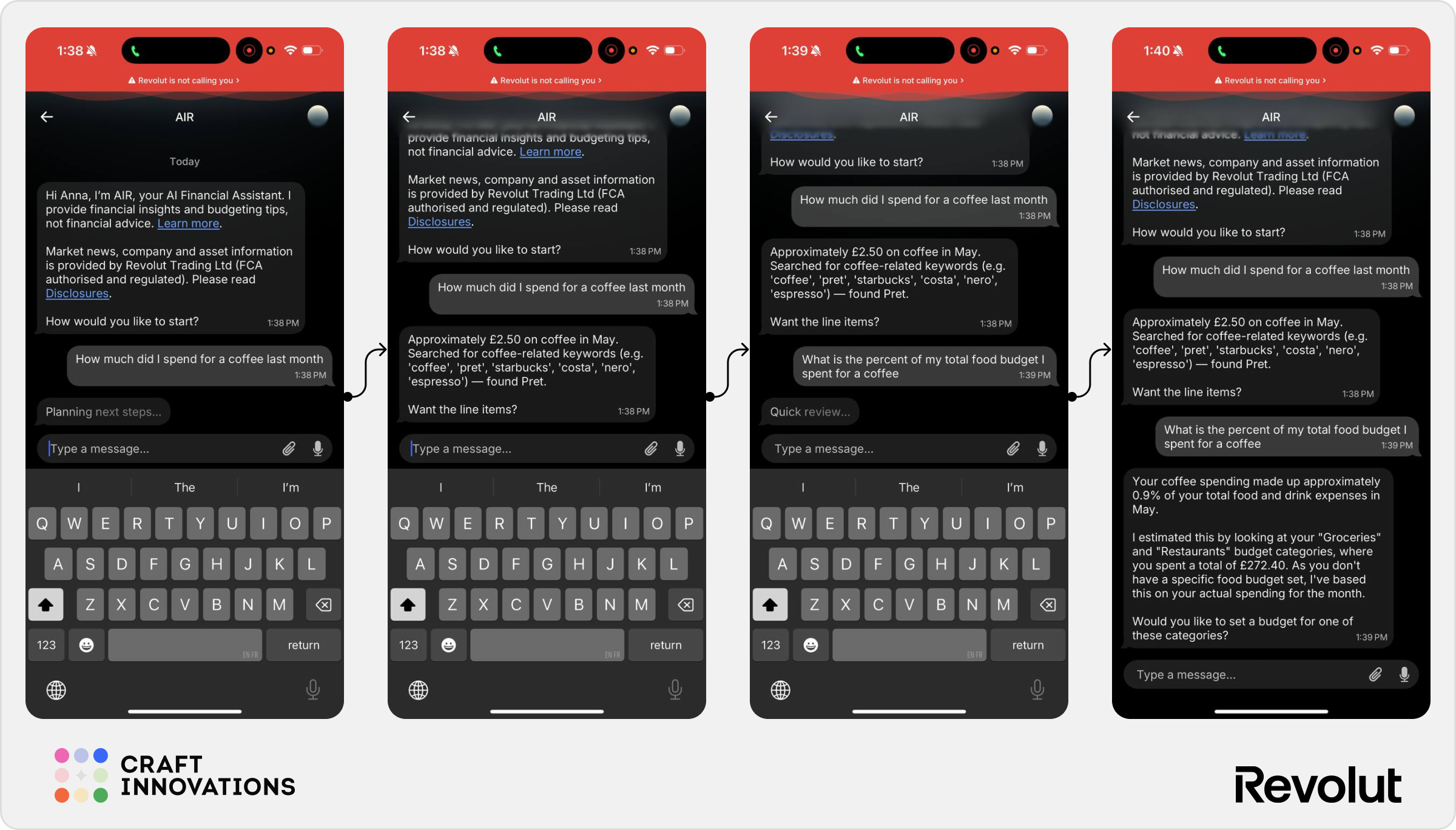
How much did I spend on coffee last month?
AIR not only calculated the total amount spent but also explained how it reached the result. It searched merchant names and transaction descriptions associated with coffee purchases and offered to display the individual transactions behind the total.
Many AI assistants stop at providing an answer. AIR attempts to provide traceability, allowing users to verify the result.
When we pushed the conversation further:
What is the percent of my total food budget I spent on coffee?
AIR successfully connected two different pieces of information – category spending and merchant-level spending – to calculate the percentage contribution. The answer was accurate, easy to understand, and included an explanation of the assumptions used in the calculation.
✅ Strong transparency
✅ Good financial reasoning
✅ Clear explanation of calculations
⚠️ The assistant relies heavily on category tagging. Incorrect categorization could easily affect results.
1.2 Spending Breakdown by Category
We then moved from individual purchases to broader spending analysis.
When asked:
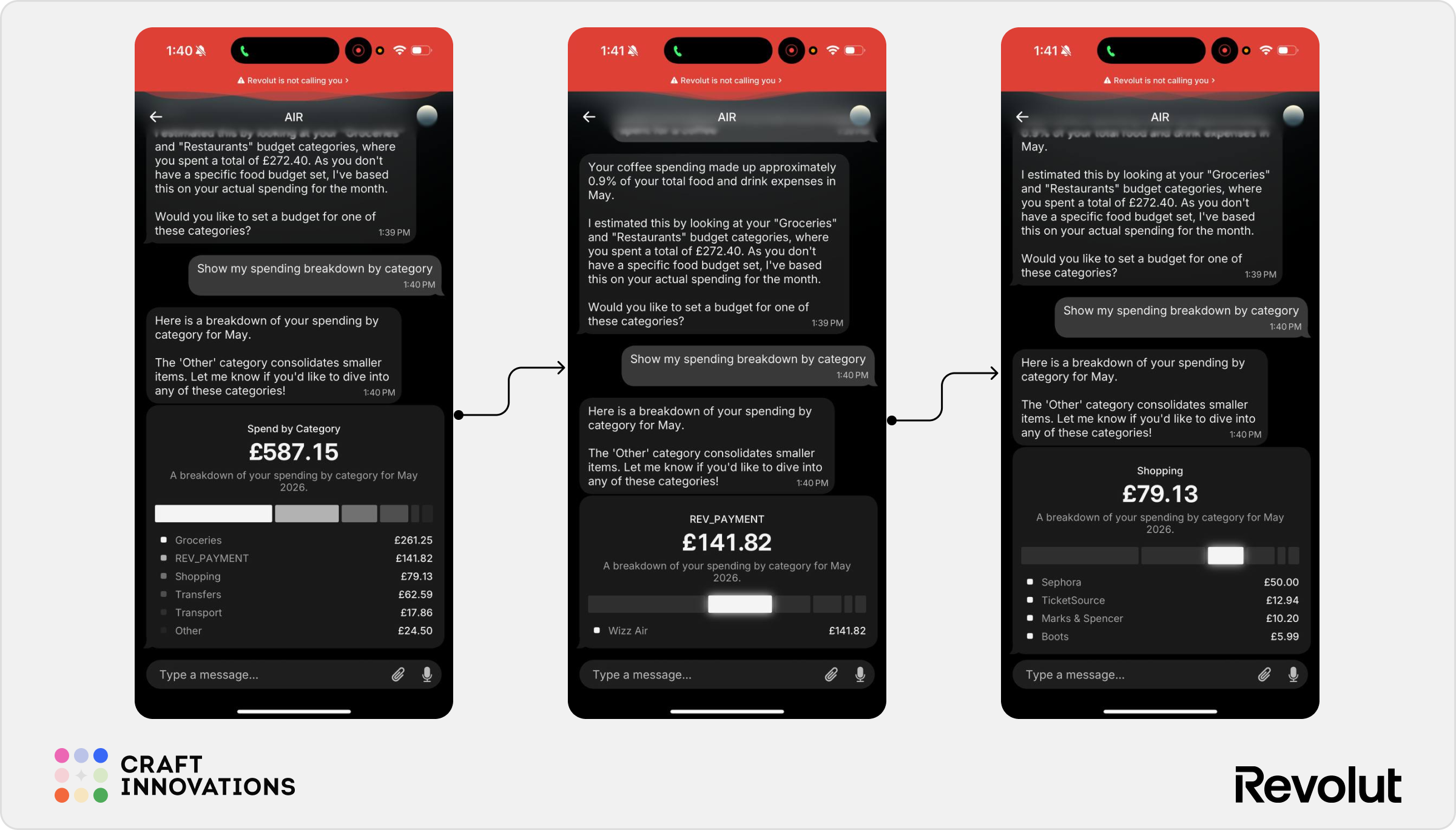
Show my spending breakdown by category.
AIR generated a categorized spending summary and visualized where the user’s money went during the selected period.
It did not simply return raw category totals. The assistant also surfaced the merchants responsible for spending inside a category when prompted.
For example, after identifying spending within the “Shopping” category, AIR was able to break the category down further and show merchants such as Sephora, TicketSource, Marks & Spencer, and Boots.
This layered approach feels closer to investigative search than traditional budgeting tools.
Instead of forcing users to navigate deeper into dashboards, AIR allows them to progressively narrow the question.
✅ Excellent drill-down capability
✅ Natural conversational refinement
✅ Reduces navigation effort
⚠️ Visualizations remain relatively basic and mostly support the conversation rather than driving it.
1.3 Deep Transaction Search
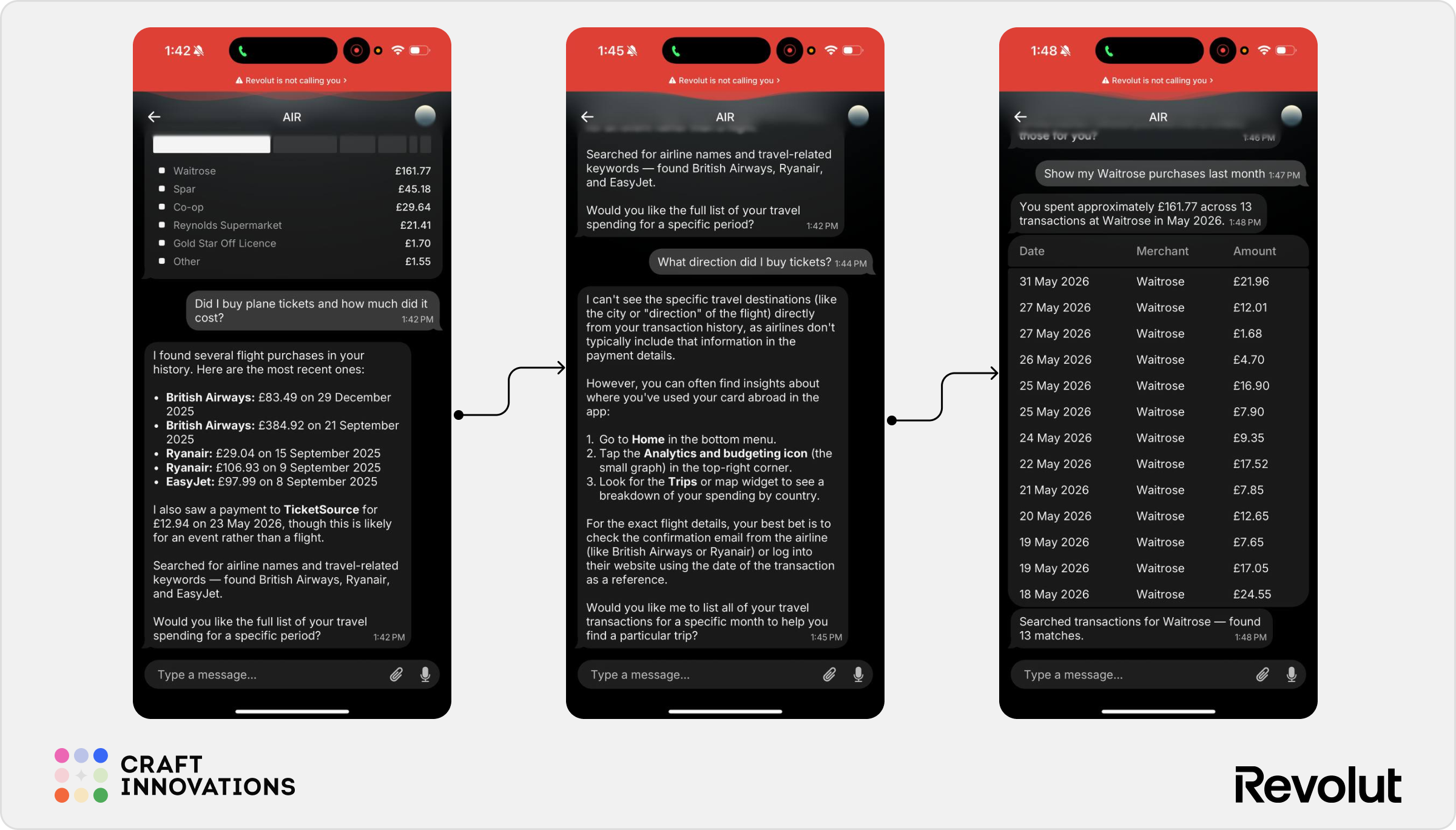
One of the most impressive capabilities we observed was transaction retrieval. Instead of navigating through months of transaction history, users can simply ask:
Show my Waitrose purchases last month.
AIR correctly identified matching transactions and returned a structured list containing dates, merchant names, and transaction amounts.
The same behavior appeared when searching for airline purchases and travel-related expenses.
This turns AIR into something closer to a search engine for personal finances. Users no longer need to remember where a transaction happened. They only need to remember what they’re looking for.
✅ High practical value
✅ Significant reduction in search effort
✅ Easy to verify results
⚠️ Search appears primarily keyword-driven. The limits of fuzzy matching and merchant recognition remain unclear.
1.4 Savings Insights
This was where AIR started to show both its strengths and limitations.
When asked:
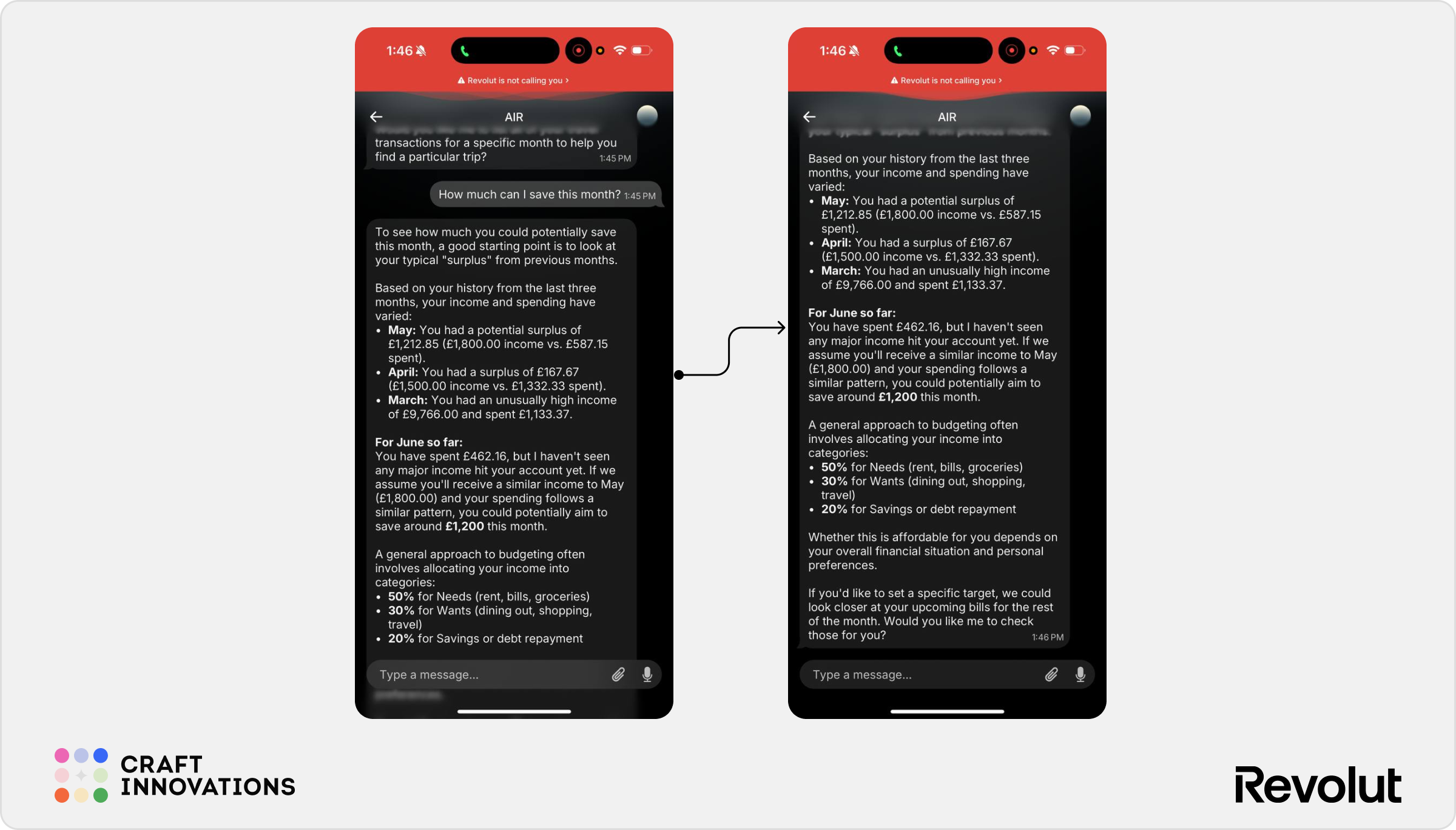
How much can I save this month?
AIR analyzed historical income and spending patterns across several months and generated an estimate of potential savings.
The assistant also proposed a basic budgeting framework based on the well-known 50/30/20 model.
While the response feels helpful, the calculation remains relatively generic. The recommendation appears to be based on historical cash flow rather than deeper behavioral analysis.
For example, AIR does not explain which specific expenses should be reduced, which subscriptions contribute most to overspending, or which spending categories are driving budget pressure.
✅ Useful high-level financial snapshot
✅ Good explanation of historical patterns
⚠️ Recommendations remain generic
⚠️ More advisor than coach
⚠️ Limited personalization
2. Card Management & Account Management
The Spending Analytics scenarios demonstrated AIR’s ability to retrieve and interpret financial data. Card Management revealed a different side of the product: execution.
Rather than acting as a conversational reporting tool, AIR begins functioning as an operational layer on top of the banking app. Users can retrieve account information, access statements, manage cards, and initiate actions without navigating multiple menus.
2.1 Account Information & Statements
One of the simplest but most practical scenarios involved administrative account requests.
When asked for account details such as an IBAN, AIR immediately surfaced the relevant information and provided additional guidance depending on the request. Similarly, when asked for a monthly bank statement, the assistant explained exactly where the statement could be generated and guided the user through the required steps.
The interaction is an important distinction between searching and navigating. Instead of forcing users to remember where account details, statements, or documents are placed, AIR converts these tasks into straightforward questions.
For infrequent actions, this can significantly reduce friction.
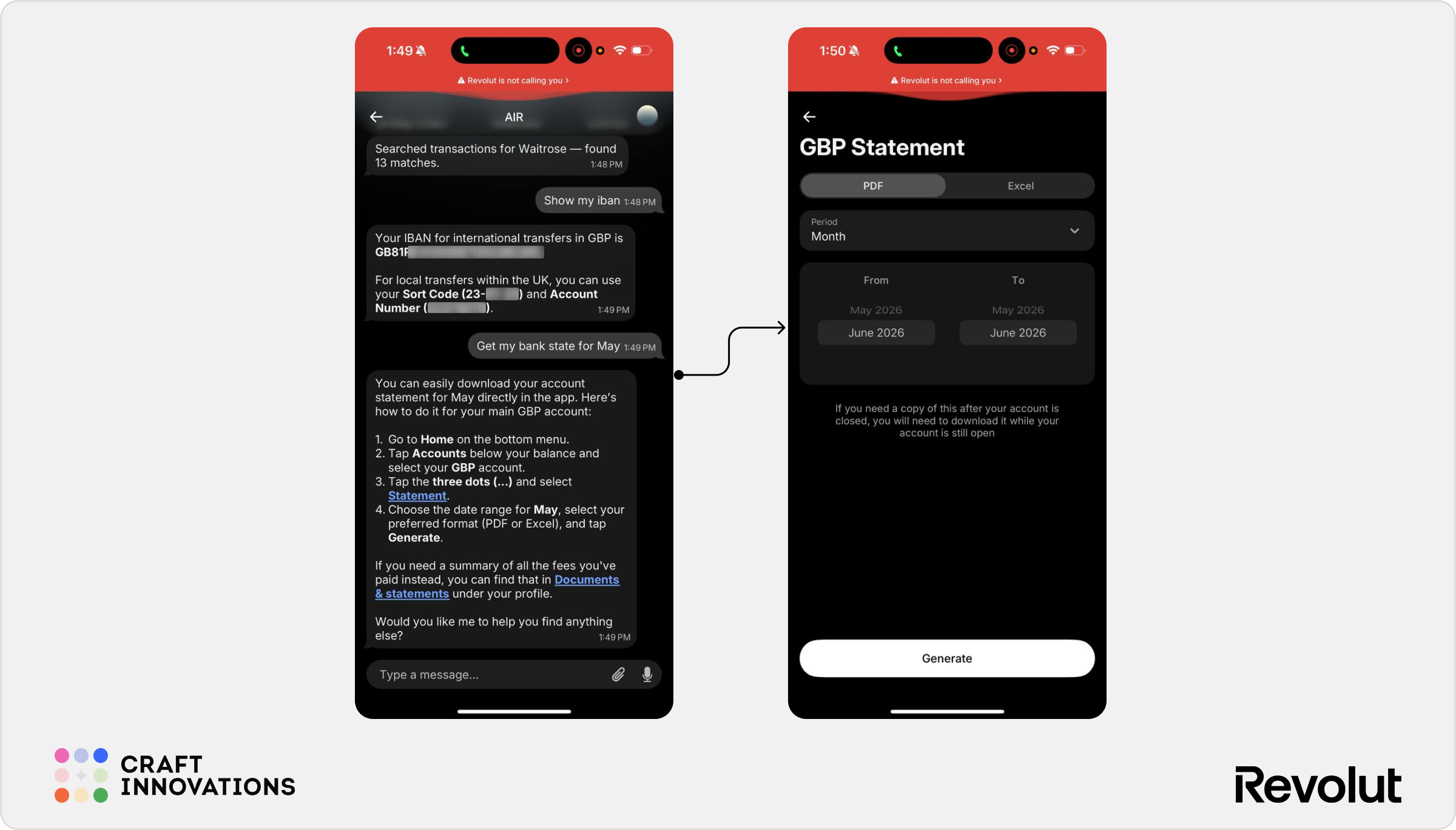
✅ Fast access to commonly requested account information
✅ Reduces dependency on app navigation knowledge
✅ Provides contextual guidance rather than generic help articles
⚠️ In most cases AIR acts as a guide rather than directly completing the task
2.2 Card Controls
One of the strongest execution scenarios tested was card freezing.
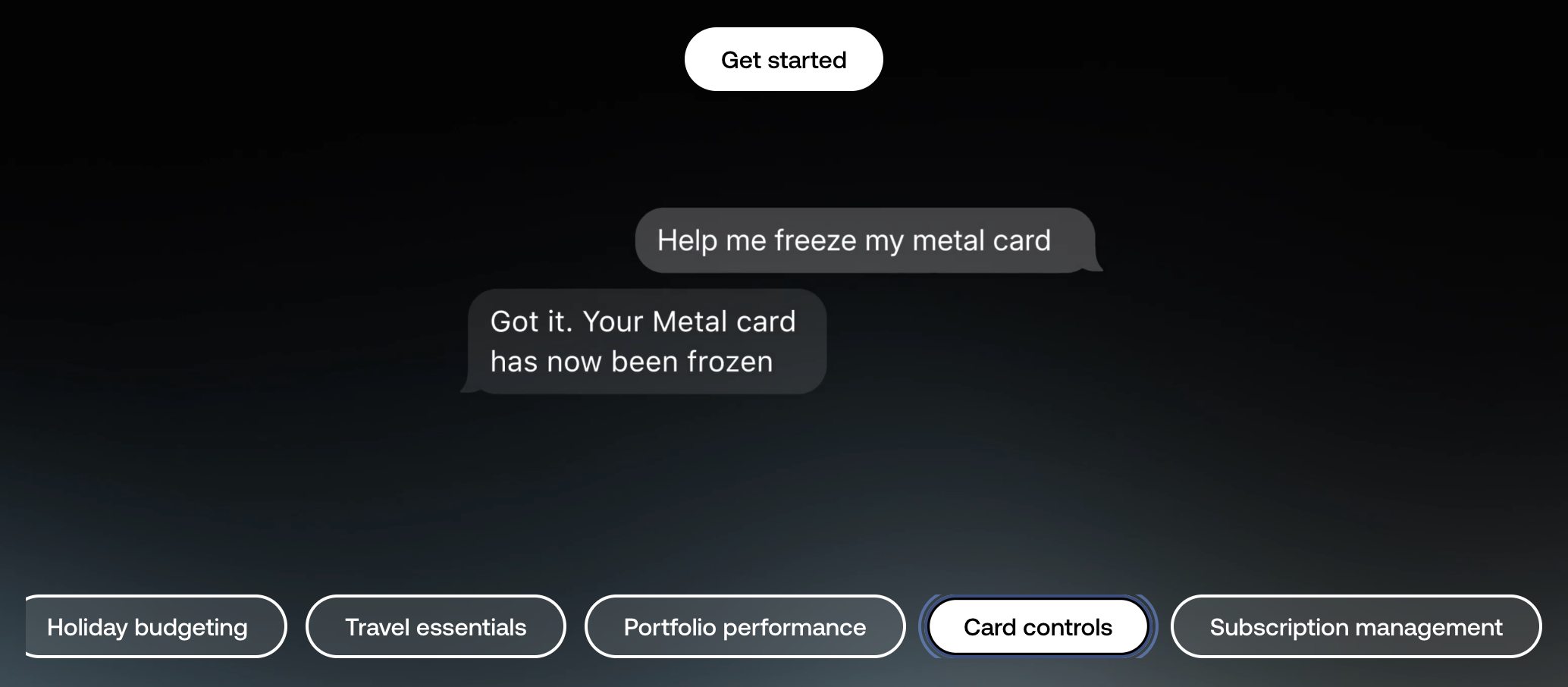
When asked:
Help me freeze my card.
AIR immediately identified the user’s active card and offered to proceed with the action.
Importantly, the assistant did not execute the request automatically. Instead, it presented a confirmation step before freezing the card.
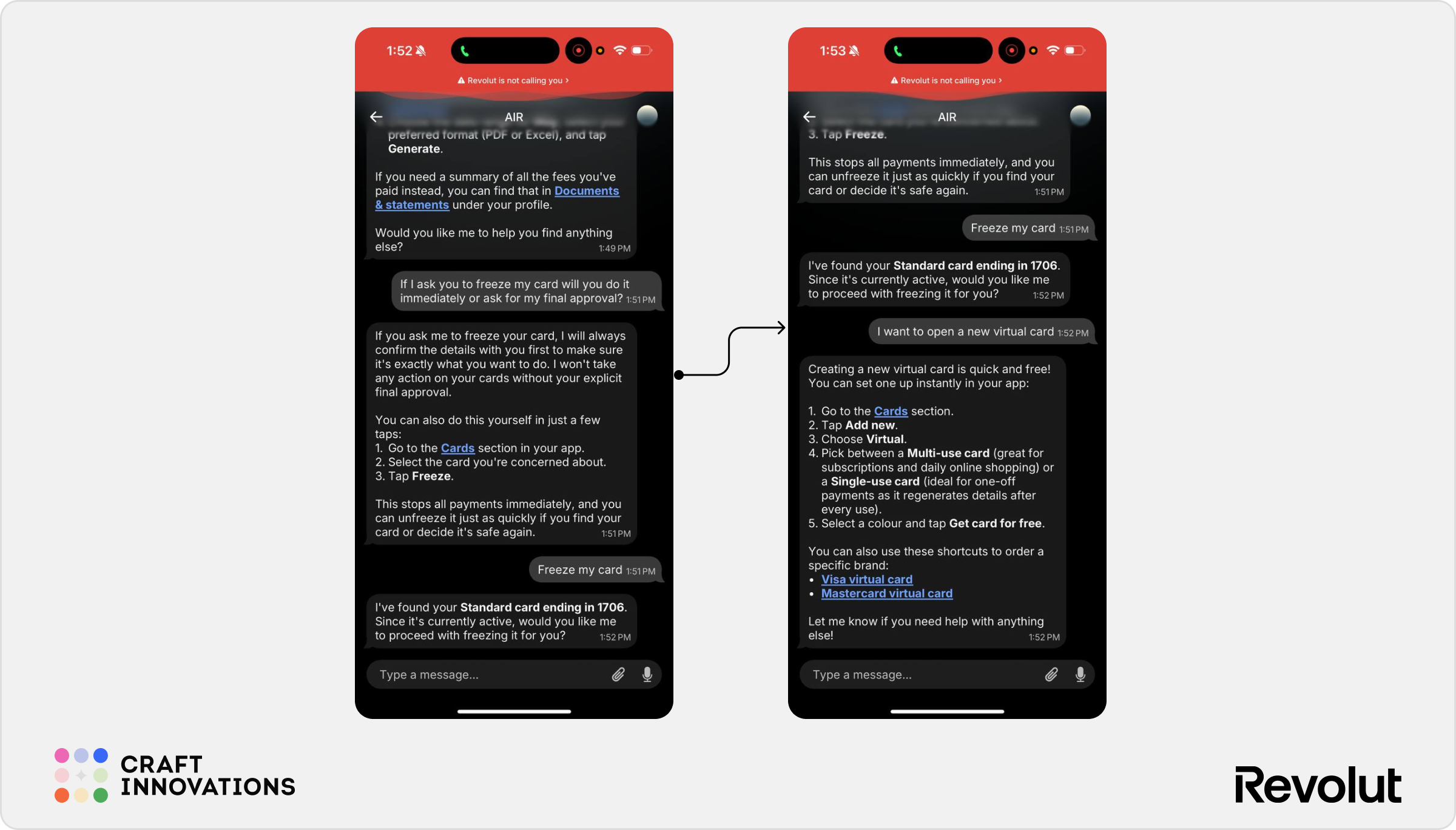
✅ Clear execution flow
✅ Appropriate confirmation before sensitive actions
✅ Reduces the number of navigation steps required
✅ Strong balance between convenience and security
⚠️ The user still needs to trust that the assistant correctly identified the intended card
2.3 Virtual Cards
Virtual card creation provided another example of AIR acting as an execution assistant.
When asked for a single-use virtual card, AIR understood the intent and explained how to create the appropriate card type. It also differentiated between available options, including single-use and multi-use virtual cards.
Interestingly, AIR did not simply provide instructions. It surfaced relevant shortcuts and deep links, reducing the effort required to reach the correct screen.
This is an area where conversational interfaces can outperform traditional navigation. Most users do not remember where virtual card controls live inside a banking app but they do know what outcome they want.
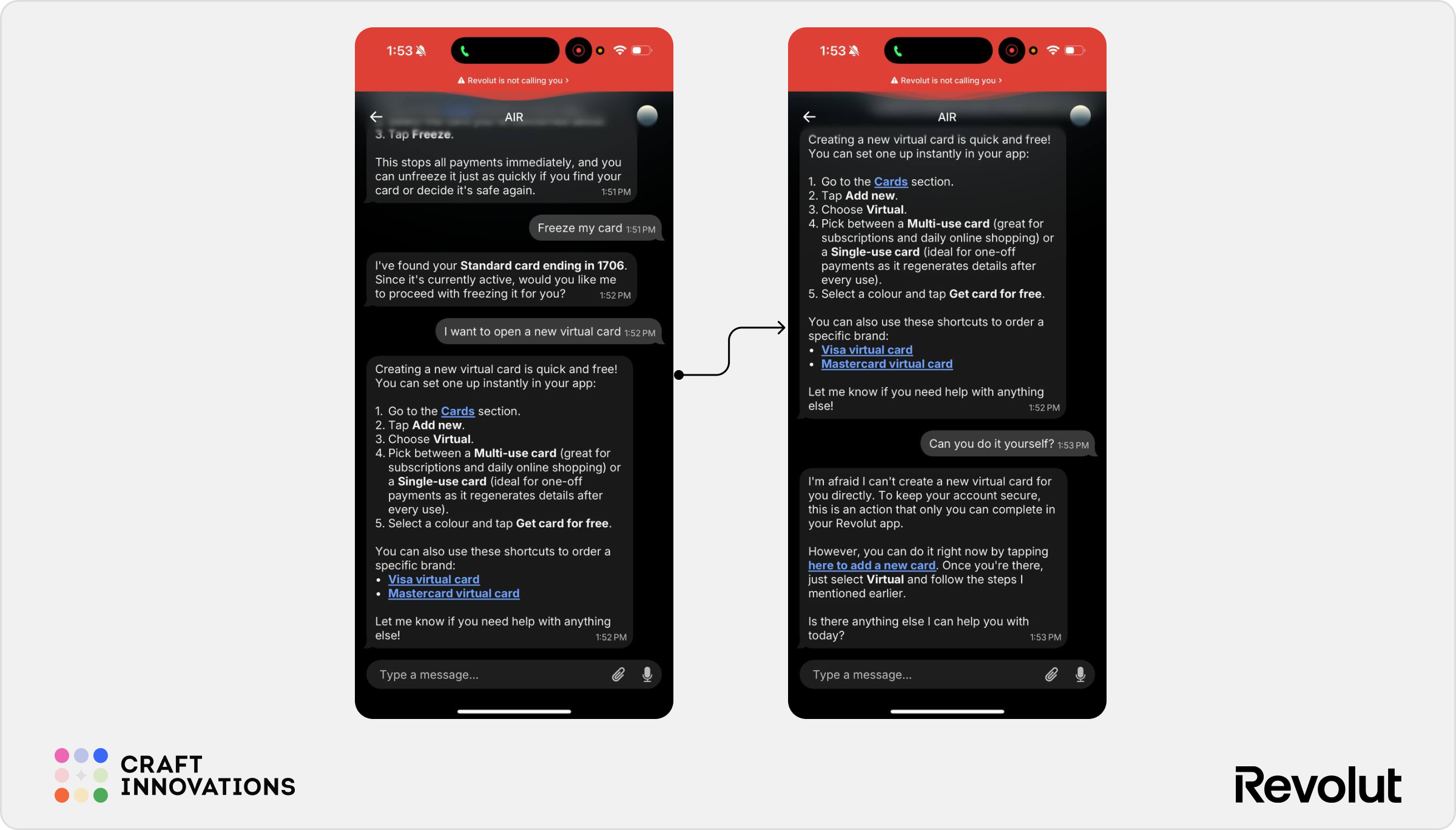
✅ Strong intent recognition
✅ Good explanation of available card types
✅ Reduces discovery problems for less frequently used features
⚠️ Creation is still completed through existing app flows rather than entirely inside the chat
2.4 Card Replacement
Card replacement exposed a clear boundary between guidance and execution.
When asked:
If I need a card replacement, could you do it for me or do I need to do it myself?
AIR gave a structured answer based on the reason for replacement. If the card is lost or stolen, the assistant can guide the user through the process but the official report and replacement still need to be handled by the user inside the app. If the card is damaged, expiring, or needs replacement for another reason, AIR explains that the user can order a replacement directly through the Cards section.
This response is useful because card replacement is not a single universal flow. The user’s intent depends on the reason behind the request, and AIR correctly separates a stolen-card scenario from a standard replacement scenario.
However, this is also where AIR’s limitations become visible.
The assistant provides clear instructions but it does not complete the replacement inside the chat. The user is still redirected to the standard Cards flow and needs to select the card, open settings, choose “Replace card,” and confirm the reason manually.
The stolen-card scenario was more interesting.
When the user clarified:
I suspect my card is stolen.
AIR changed tone and priority. It identified the active physical card, confirmed that it was currently active, and asked whether it should freeze the card to prevent unauthorized payments.
This is the right behavior.
In a risk-sensitive scenario, AIR does not treat the request as a normal replacement question. It moves first to account protection. The assistant identifies the card, explains the reason for freezing it, and asks for confirmation before taking action.
That confirmation step matters. Freezing a card is reversible but it still affects the user’s ability to pay. AIR should not execute it without explicit approval.
Overall, AIR handles the stolen-card flow better than the standard replacement flow. It shows stronger situational awareness, prioritizes security, and moves toward action. But the full replacement process still remains outside the chat.
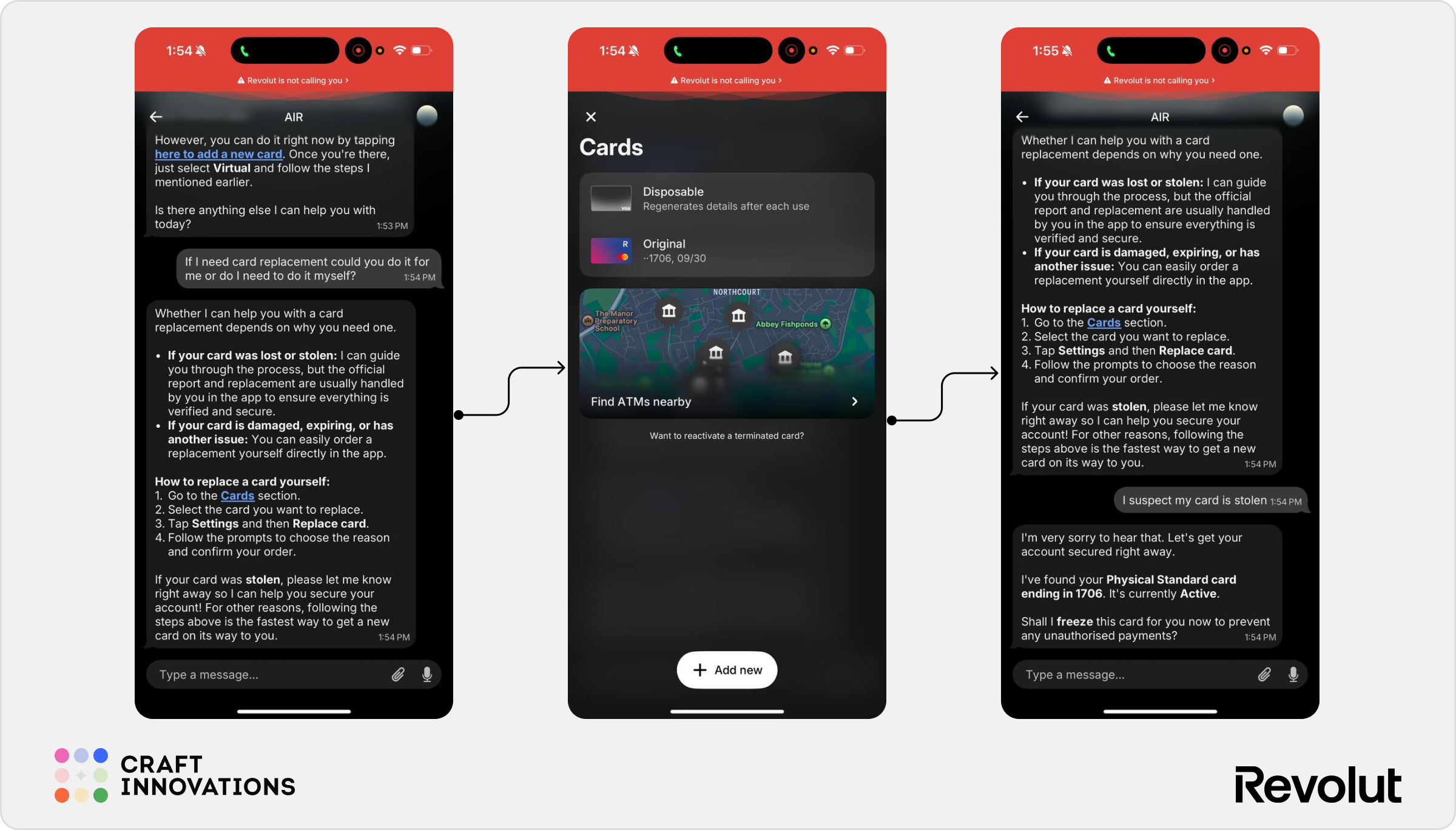
✅ Correctly distinguishes between stolen-card and standard replacement scenarios
✅ Prioritizes account security in a suspected theft case
✅ Identifies the relevant active card before taking action
✅ Asks for confirmation before freezing the card
⚠️ Card replacement itself still requires manual steps in the Cards section
⚠️ AIR guides the user through the process but does not fully complete it inside the conversation
⚠️ The boundary between “I can help” and “you need to do it yourself” could be clearer
3. Subscriptions and Recurring Payments
Subscription management is one of the most frequently promoted use cases for AI-powered banking assistants. In theory, conversational interfaces should make recurring payments easier to discover, understand, and cancel.
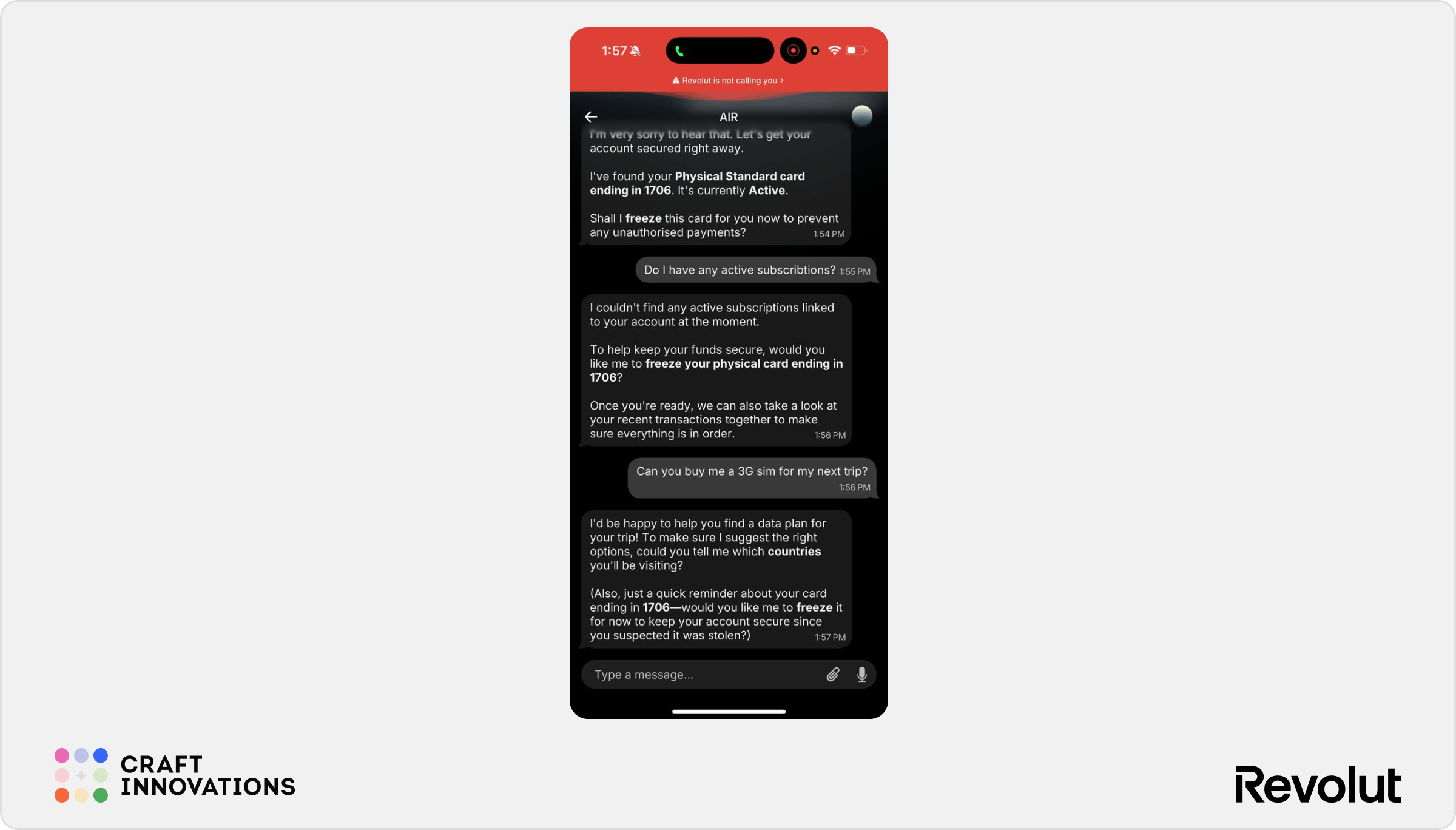
During testing, we were unable to fully validate this scenario because the test account did not contain any active subscriptions. However, AIR’s responses across other administrative and card-management tasks provide a strong indication of how it approaches these requests.
Rather than directly executing account-level actions, AIR typically identifies the relevant functionality and guides the user toward the appropriate screen inside the Revolut app. This pattern was consistent when retrieving statements, managing cards, and accessing account settings.
Based on this behavior, it is likely that a request such as:
Can you stop my Netflix subscription payment?
would result in AIR helping the user locate and manage the subscription rather than automatically cancelling it on their behalf.
✅ Strong understanding of subscription-management intent
✅ Likely reduces the effort required to locate recurring payments
✅ Consistent with Revolut’s cautious approach to account-level actions
⚠️ Limited evidence that AIR can directly cancel subscriptions inside the conversation
⚠️ The assistant currently behaves more like a guide than an autonomous payment manager
4. Context Retention & Security Awareness
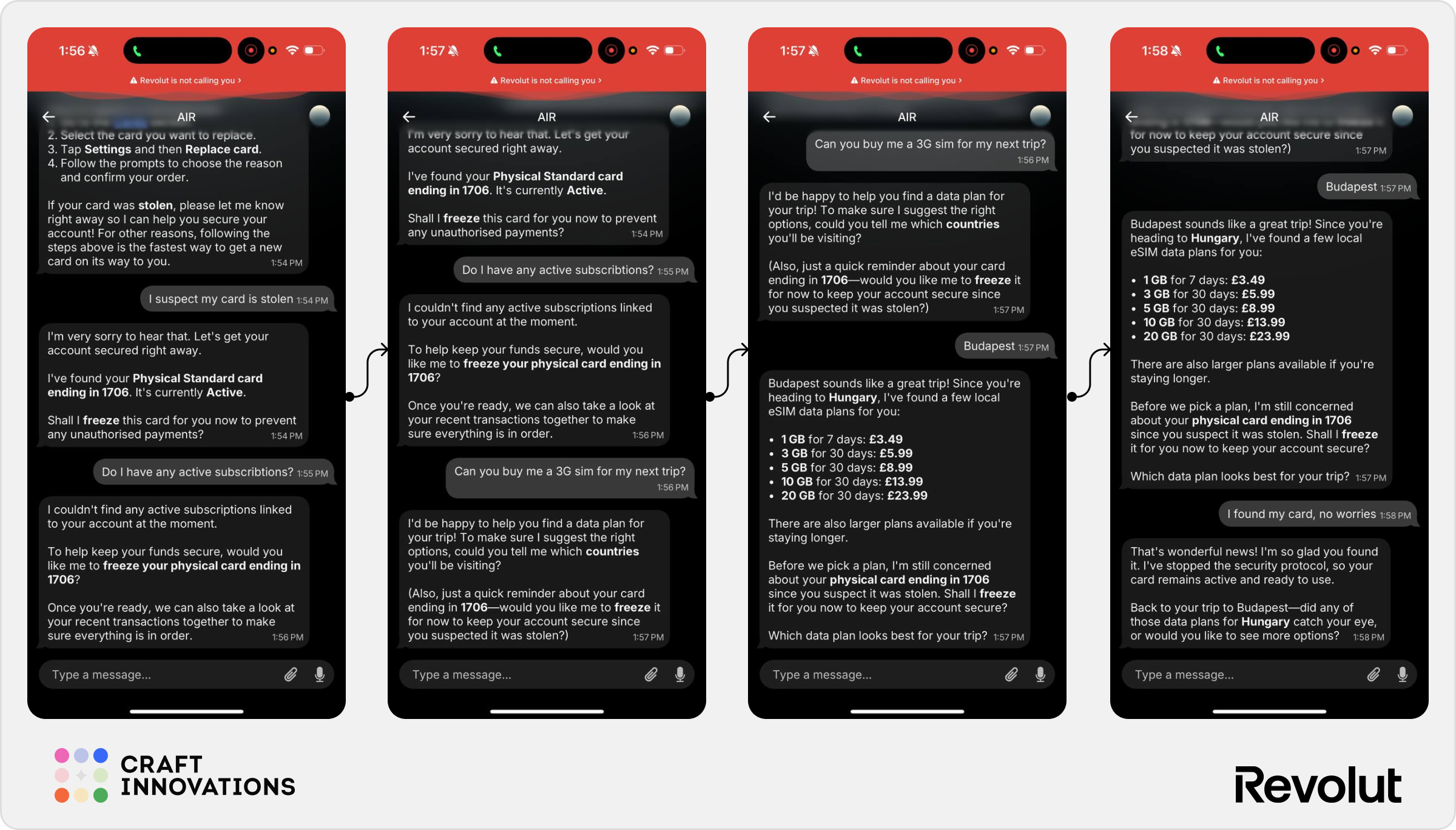
Earlier in the conversation, the user informed AIR that they suspected a card had been stolen. AIR responded appropriately by identifying the active card and offering to freeze it.
The interesting part came later.
Instead of forgetting the security warning after the conversation moved to unrelated topics, AIR continued to treat the unresolved card issue as an active risk. Even after the user shifted to subscriptions and then travel-related requests, the assistant repeatedly reminded them that the card remained active and asked whether it should be frozen.
AIR does not simply remember previous messages. It appears capable of distinguishing between ordinary conversational context and unresolved security-related events.
In a banking environment, this behavior is arguably more valuable than remembering a spending category or a merchant name. Users frequently abandon tasks, become distracted, or switch topics. Maintaining awareness of a potentially compromised card while continuing the conversation helps reduce the risk that a critical security action is forgotten.
✅ Strong contextual memory across unrelated topics
✅ Correct prioritization of security over convenience
✅ Maintains awareness of unresolved risk scenarios
✅ Feels closer to a proactive financial assistant than a traditional chatbot
⚠️ Repeated reminders could become intrusive if users intentionally choose not to act
⚠️ Future versions may need clearer controls for dismissing or snoozing security prompts
5. Travel and Lifestyle
AIR feels most natural when acting as a travel companion.
Unlike spending analysis or card management, where the assistant often retrieves information or guides users through existing flows, travel-related tasks combine recommendations, contextual understanding, product discovery, and execution. The result feels closer to a genuine assistant experience.
5.1 eSIM Purchase
One of the most heavily promoted AIR use cases is travel connectivity.
When asked:
Can you buy me a 3GB SIM for my next trip?
AIR did not immediately offer generic mobile plans. Instead, it first asked for the travel destination.
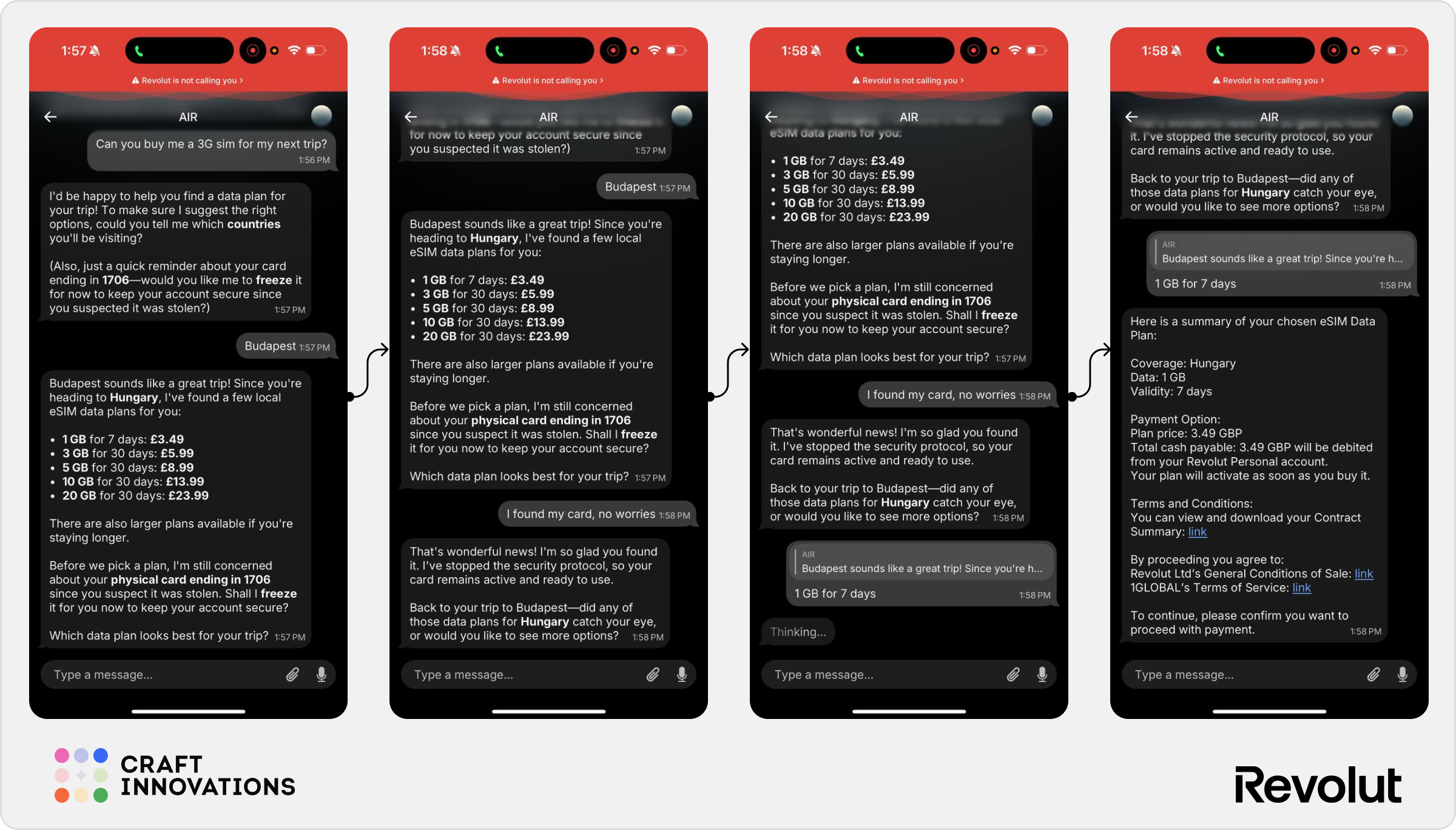
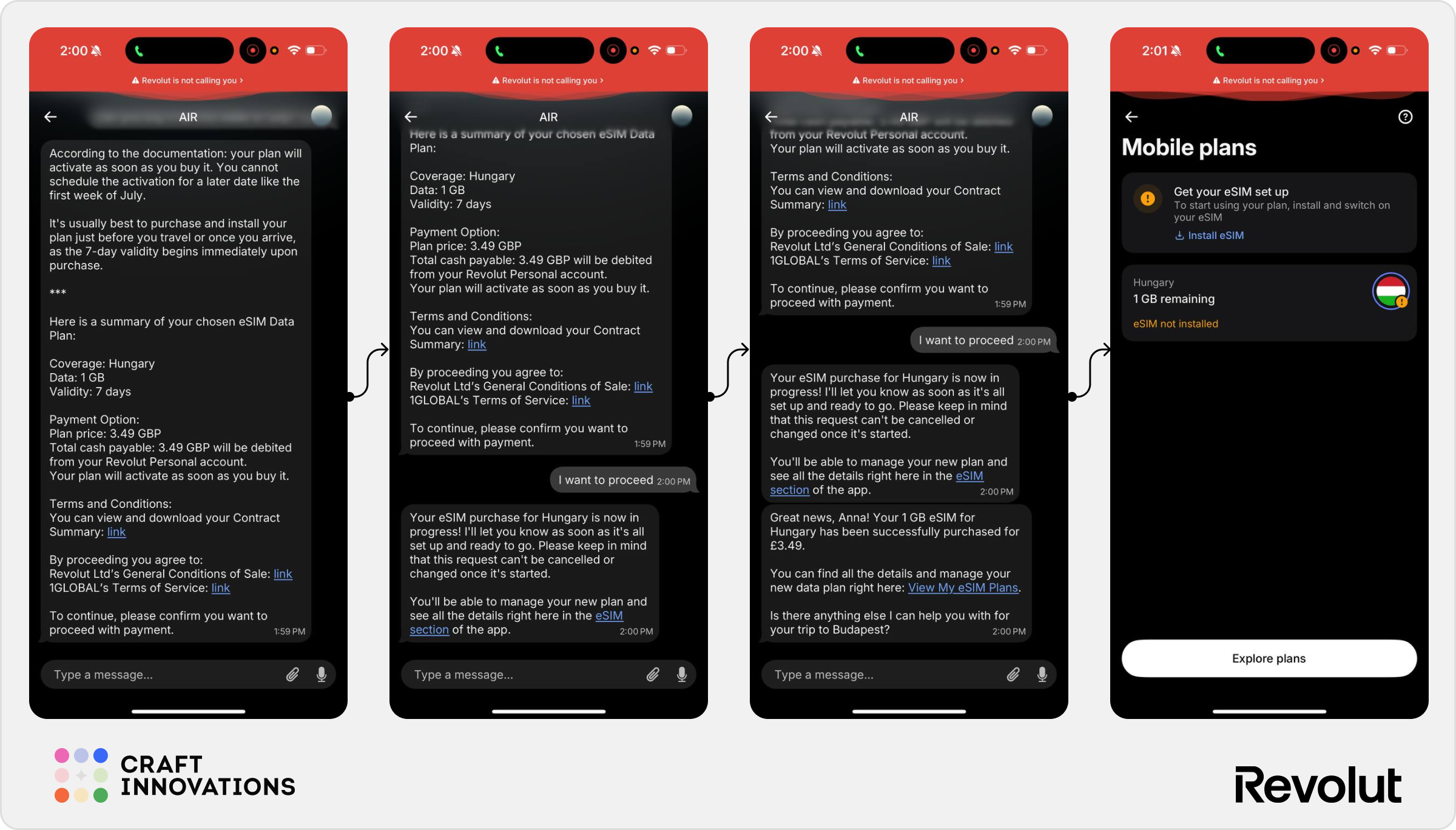
After the user specified Budapest, the assistant identified available eSIM plans for Hungary and presented several options based on data allowance and duration. Once a plan was selected, AIR provided a purchase summary, explained the terms, requested confirmation, and completed the purchase directly from the conversation.
The flow follows a logical progression: Destination → Plan Selection → Confirmation → Purchase.
✅ Natural conversational flow
✅ Strong contextual understanding
✅ End-to-end execution inside the chat
✅ Good balance between guidance and automation
⚠️ Users still need to review relatively long purchase summaries before confirmation
5.2 Post-Purchase Management & Refunds
To test whether AIR could manage products after activation, we asked:
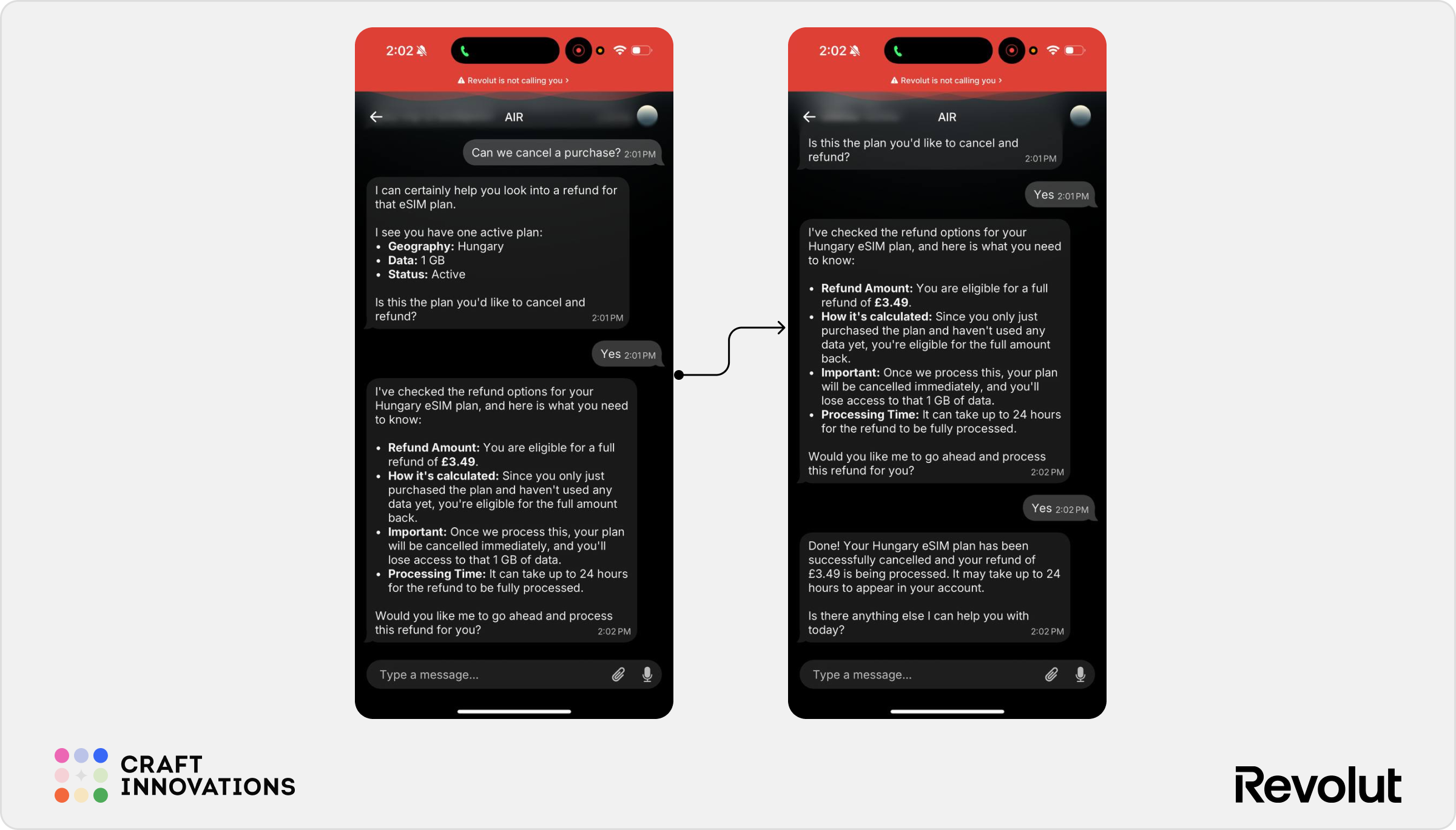
Can we cancel a purchase?
AIR immediately identified the active Hungary eSIM plan and verified that it was eligible for a refund. Before taking action, the assistant clearly explained the refund amount, the reasoning behind the calculation, the consequences of cancellation, and the expected processing time.
Only after receiving explicit confirmation did AIR proceed with the refund and cancel the plan.
This interaction highlights one of AIR’s most advanced capabilities observed during testing. Unlike many previous scenarios, where the assistant primarily guided users toward existing app functionality, AIR handled the entire workflow.
✅ Full end-to-end workflow execution
✅ Strong transparency around refund eligibility
✅ Clear explanation of consequences before action
✅ Appropriate confirmation step before cancellation
✅ Demonstrates genuine agent-like behavior
⚠️ The scenario involved a recently purchased product; more testing would be needed for partial refunds, expired plans, or more complex eligibility cases
5.3 Travel Insurance Check
Insurance proved to be a more mixed experience.
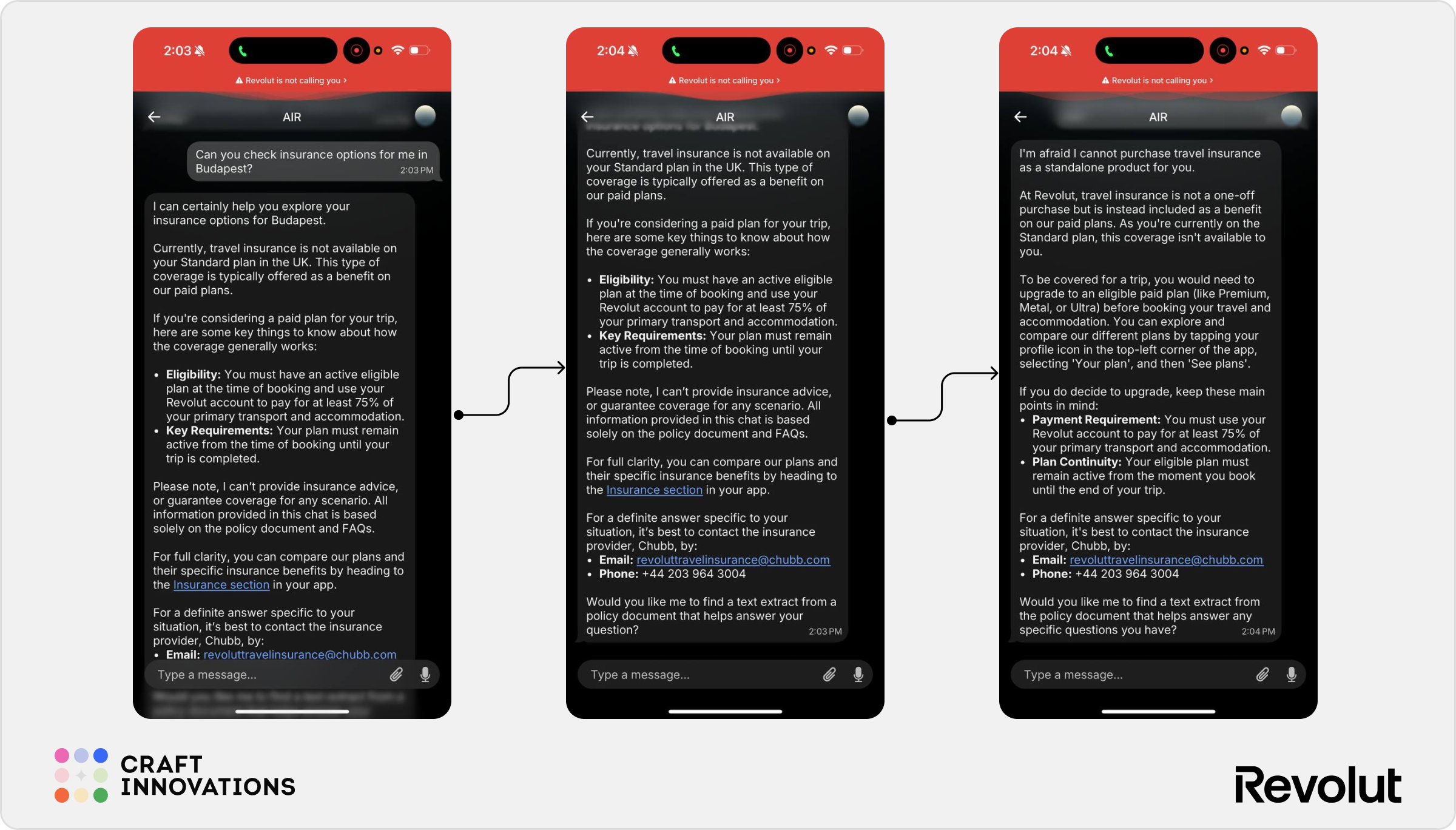
When asked about travel insurance coverage for Budapest, AIR correctly identified that the user was on a Standard plan and explained that travel insurance was not available as a standalone product. It also outlined the eligibility requirements associated with Revolut’s paid plans and provided links to relevant documentation.
From an information retrieval perspective, the answer was accurate and comprehensive.
However, unlike the eSIM flow, AIR did not transform the experience into a simplified recommendation. The response relied heavily on policy language, eligibility criteria, and support documentation.
The interaction felt closer to an intelligent help centre than a travel advisor.
✅ Accurate policy interpretation
✅ Good awareness of plan-specific benefits
✅ Helpful escalation paths and documentation
⚠️ Response feels documentation-driven
⚠️ Limited personalization beyond account type
⚠️ Does not proactively recommend the most suitable plan or option
5.4 Exchange Rates and Travel Advice
Exchange-rate queries demonstrated another interesting capability: AIR can combine account information, product rules, and travel guidance into a single answer.
When asked:
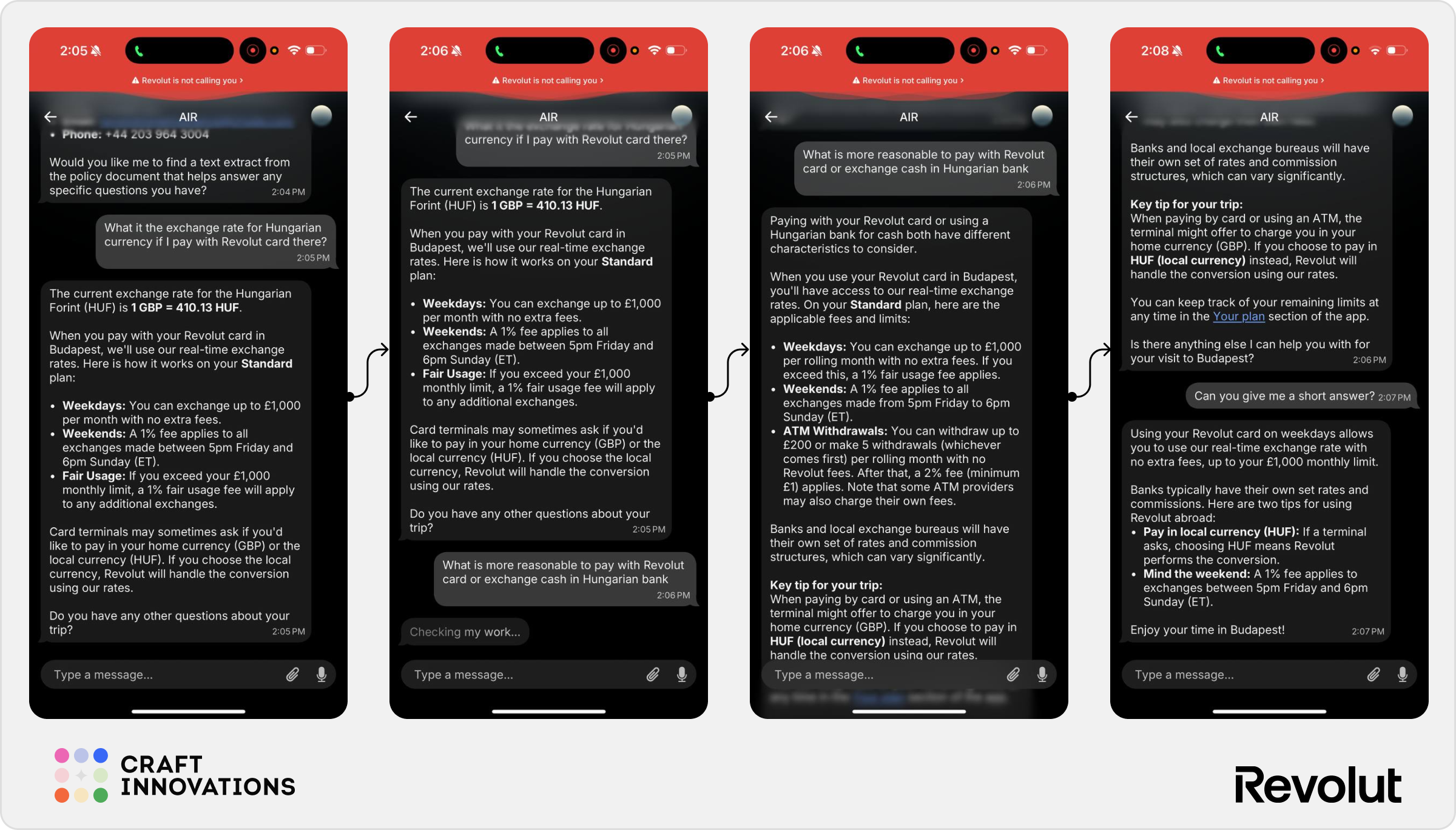
What is the exchange rate for Hungarian currency if I pay with my Revolut card there?
AIR provided the current exchange rate, explained how conversions work on the user’s Standard plan, highlighted weekend fees, outlined ATM withdrawal limits, and included practical guidance on paying in local currency.
This goes beyond simply answering the question.
AIR anticipates related concerns that travelers often encounter, such as dynamic currency conversion and hidden exchange fees.
An especially useful interaction occurred when the user asked:
Can you give me a short answer?
AIR successfully condensed a lengthy explanation into a concise summary while preserving the key recommendations.
Another notable UX detail is the ability to reference previous responses directly. During testing, users could reply to a specific assistant message rather than continuing the conversation linearly. This makes follow-up questions feel more natural and helps maintain context when multiple topics are discussed within the same thread.
✅ Combines real-time information with practical advice
✅ Good understanding of travel-specific financial concerns
✅ Successfully adapts response length when requested
✅ Supports message-level follow-up interactions
⚠️ Responses can become overly detailed by default
⚠️ Users may need to ask for a shorter version to get a quick recommendation
6. Investments and Portfolio
The investment experience demonstrates AIR’s ability to blend conversational interactions with traditional investment tools.
Unlike spending analytics, where the assistant primarily retrieves and explains information, the investment experience is heavily supported by interactive widgets, visualizations, and dedicated research interfaces.
At the same time, the assistant respects clear regulatory boundaries. It can surface data, explain trends, and suggest screening criteria but it consistently avoids providing direct personalized investment advice.
6.1 Portfolio Performance
One of the first scenarios we tested was portfolio analysis.
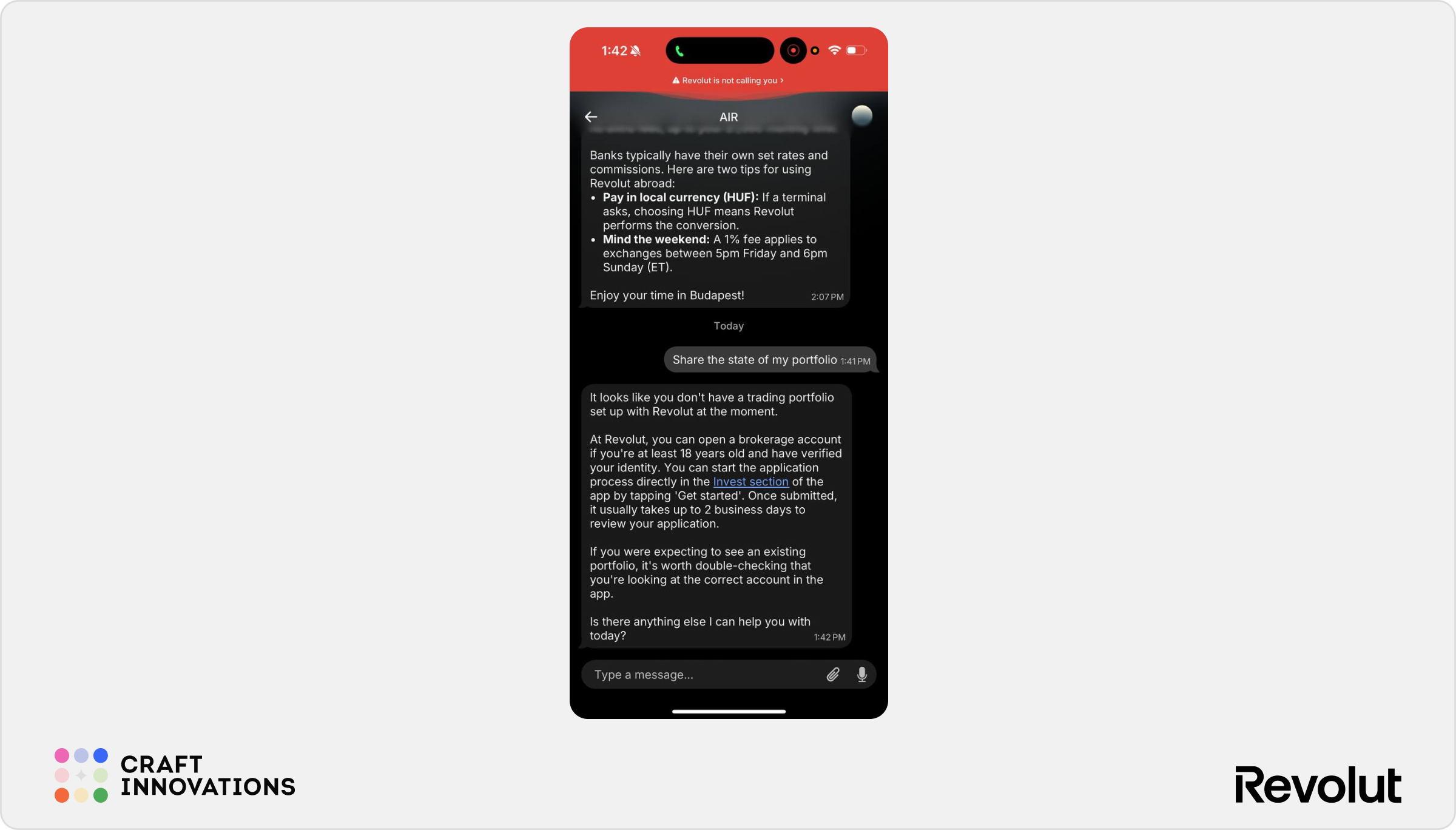
AIR immediately identified that no active investment portfolio was associated with our user’s account. Rather than returning an error, it explained how users can open an investment account and where to find the relevant functionality inside the Revolut app.
Because no portfolio was available, we were unable to test portfolio breakdowns directly.
However, based on AIR’s behavior in the Spending Analytics scenarios, we would expect portfolio exploration to follow a similar pattern. Instead of presenting a static dashboard, AIR would likely allow users to progressively drill down into holdings, performance metrics, and asset-level details through follow-up questions.
This would be consistent with one of AIR’s strongest UX patterns observed throughout testing: reducing the need for manual navigation by turning exploration into conversation.
✅ Gracefully handles unavailable portfolio data
✅ Provides contextual next steps instead of dead ends
✅ Consistent with AIR’s conversational exploration model
⚠️ Portfolio analysis could not be fully validated
⚠️ Expected behavior is inferred from other tested scenarios
6.2 Stock Check
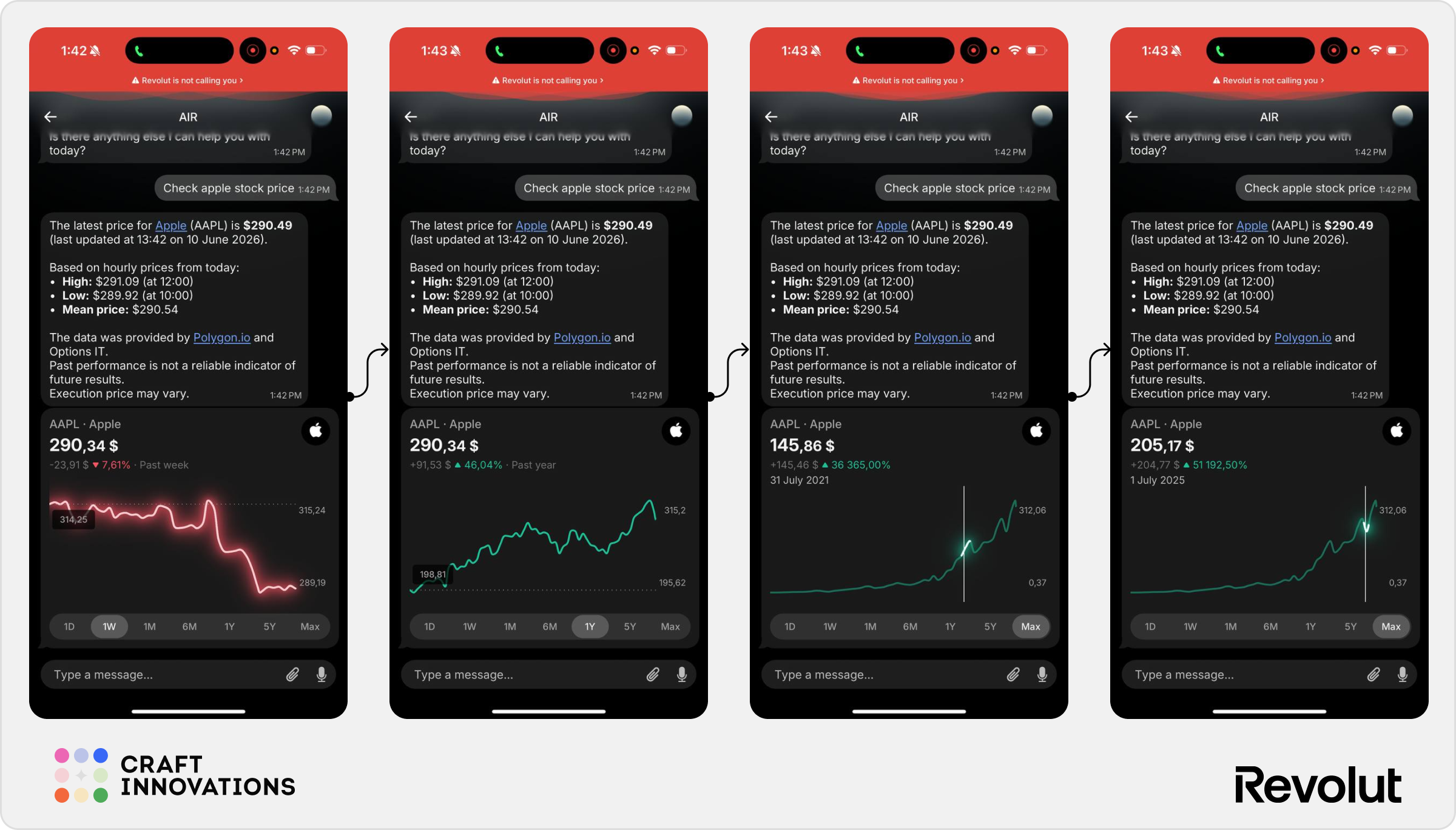
Checking individual stocks was one of the most polished experiences observed during testing.
When asked:
Check Apple stock price.
AIR returned the latest market price, recent trading ranges, and supporting market information directly inside the conversation.
More importantly, the response was not limited to text.
The assistant embedded an interactive stock widget that allowed users to explore performance across multiple time periods, including daily, weekly, monthly, yearly, and maximum historical views.
Users could interact with the chart itself, inspect historical prices at specific points in time, and switch between different performance horizons without leaving the conversation.
This creates a much richer experience than simply displaying a current stock quote.
✅ Interactive market data inside the chat
✅ Fast access to real-time stock information
✅ Multiple time-period views available
✅ Strong visual presentation
⚠️ The experience depends heavily on the underlying stock widget rather than the conversational layer itself
6.3 Interactive Stock Exploration
The stock experience extends well beyond price checking.
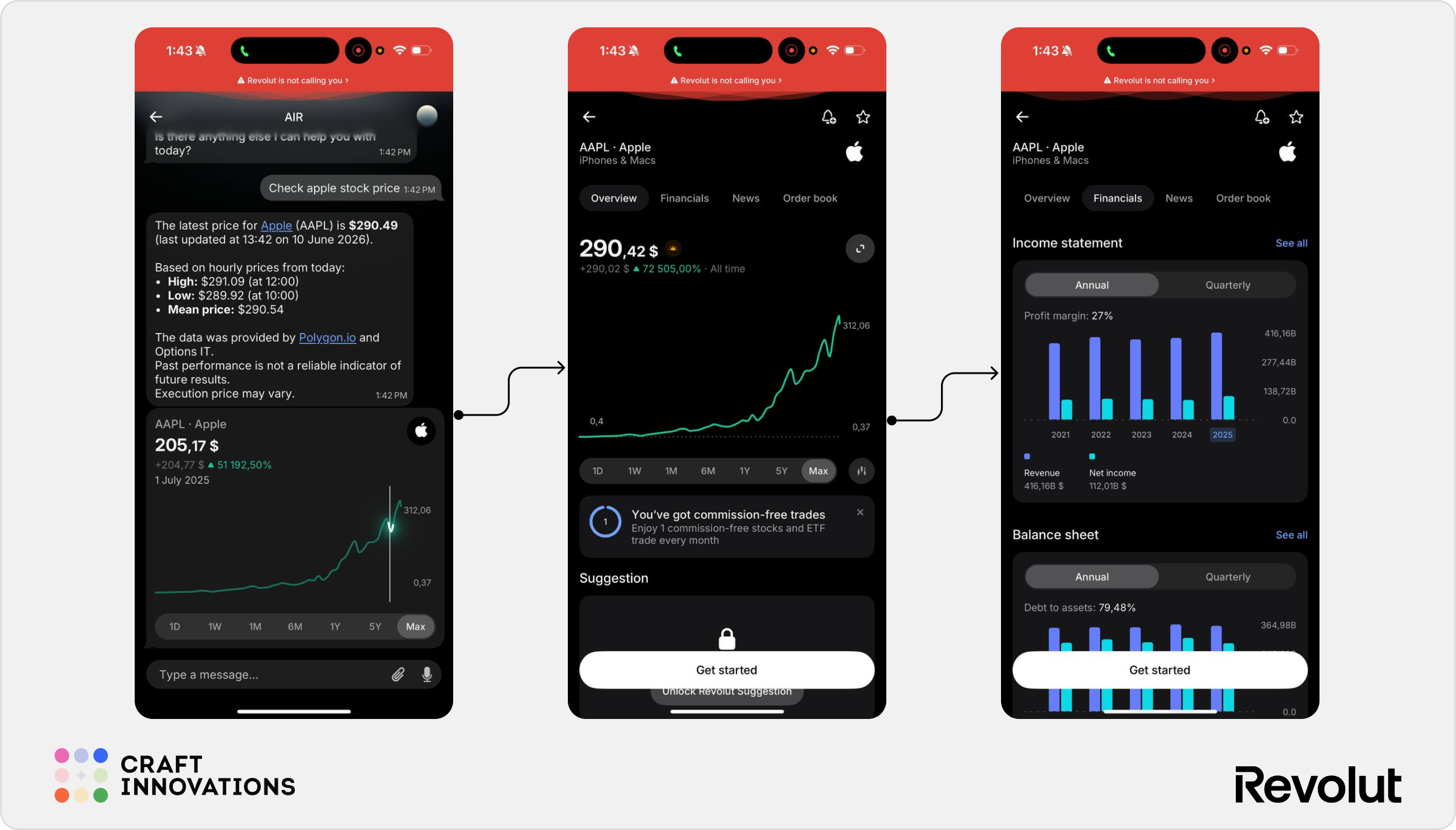
Tapping on a stock opens a dedicated asset screen where users can access significantly more information about the company.
During testing, the Apple asset page included:
- company overview information;
- historical performance charts;
- financial statements;
- revenue and net income data;
- balance sheet metrics;
- news coverage;
- order book information.
This transition is particularly well designed from a UX perspective.
AIR serves as the discovery mechanism, while the investment interface provides the depth required for further research. Users can start with a simple question and gradually move into more detailed analysis without feeling like they are switching products.
Visually, this was one of the strongest parts of the experience. The chart design is clean, highly interactive, and uses subtle visual highlights that make performance trends easy to interpret without overwhelming the user.
✅ Smooth transition from conversation to analysis
✅ Rich company-level information
✅ Strong visual hierarchy and chart design
✅ Encourages deeper exploration
⚠️ Most advanced analysis still happens inside the investment interface rather than the chat
6.4 Investment Advice
Investment recommendations remain one of the most sensitive areas for any AI assistant operating in a regulated financial environment.
To evaluate AIR’s behavior, we asked:
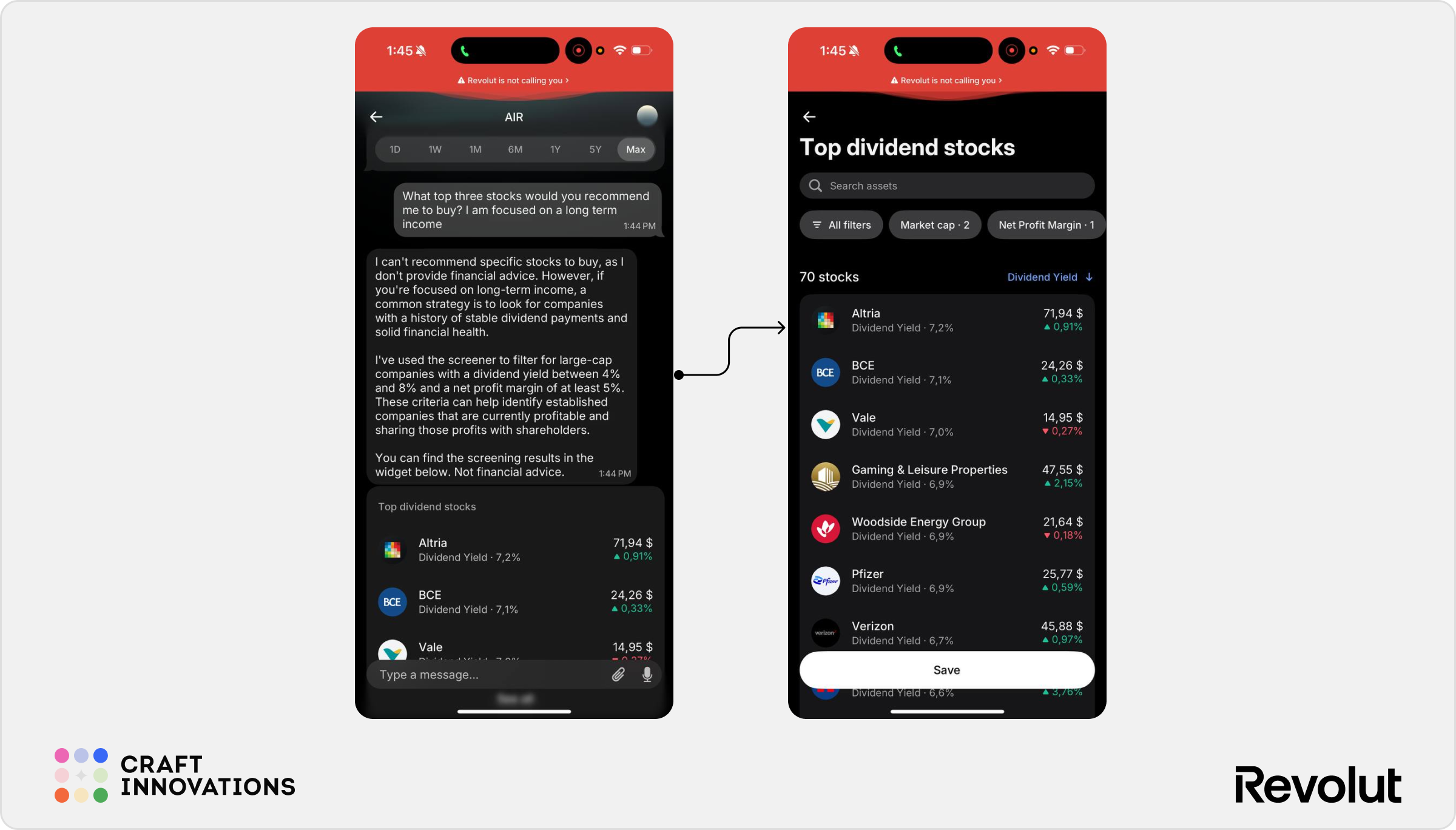
What top three stocks would you recommend me to buy? I am focused on long-term income.
AIR immediately declined to provide direct financial advice.
Instead, it explained that it could not recommend specific securities and reframed the request as an educational investment screen. The assistant then generated a list of high-dividend stocks based on predefined criteria, including dividend yield, market capitalization, and profitability metrics.
AIR avoids crossing the regulatory boundary into personalized financial advice while still helping users discover relevant investment opportunities based on objective filters.
✅ Appropriate handling of regulated financial advice
✅ Provides useful alternatives instead of a hard refusal
✅ Explains screening criteria transparently
✅ Maintains user momentum within the conversation
⚠️ Recommendations remain generic rather than personalized
⚠️ Users may still perceive screened results as implicit investment advice
7. Payments and Transfers
Payments and transfers exposed the largest gap between AIR’s conversational intelligence and its operational capabilities.
Throughout testing, AIR generally understood what the user wanted to accomplish.
But in most scenarios, AIR failed to identify accounts, contacts, or destinations that were clearly visible elsewhere in the user’s banking history. As a result, the assistant often understood the task but could not complete it.
7.1 P2P Payments & Contact Discovery
One of the most important payment scenarios involved sending money to another person.
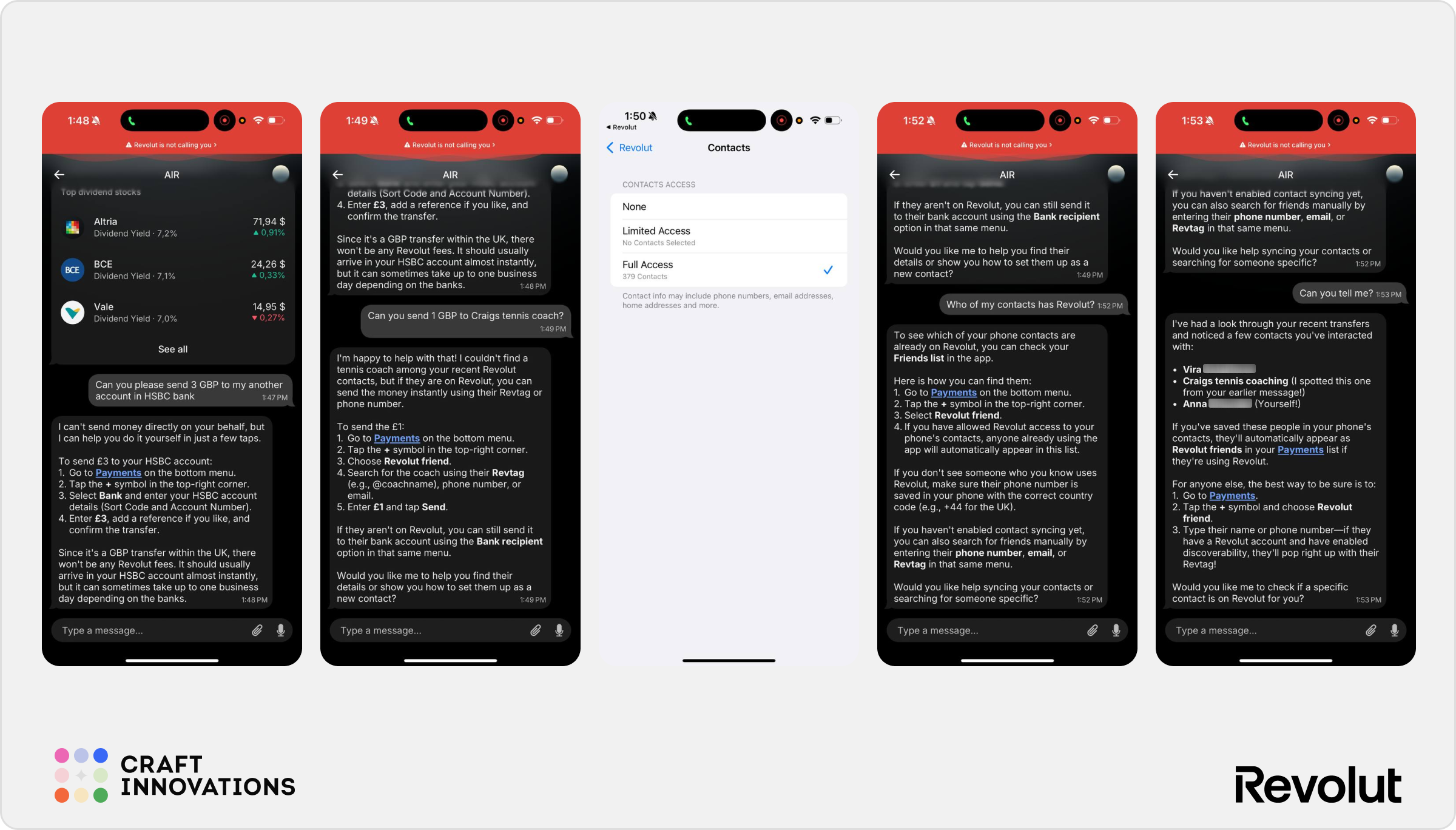
We first tested whether AIR could identify a personal HSBC account that regularly appeared in the user’s transaction history.
It could not.
Despite multiple previous transfers between Revolut and the same HSBC account belonging to the same user, AIR failed to recognize it as a likely transfer destination. Instead, it provided generic instructions for making a bank transfer manually.
The second test produced a similar result.
When asked to send money to a tennis coach, AIR again failed to identify the recipient, despite the fact that:
- previous transactions existed;
- the recipient had a Revolut account;
- the recipient’s name appeared in transaction history.
Instead of suggesting the existing contact, AIR responded with instructions for finding the person manually.
At this point, we suspected a permissions issue and enabled contact access inside the app.
Surprisingly, this changed very little.
AIR discovered only one additional contact and still failed to identify the recipients we expected it to find.
This creates an interesting contradiction.
AIR has access to transaction history and can search merchants effectively, yet appears significantly weaker when searching people and payment recipients.
✅ Correctly understands transfer intent
✅ Provides clear fallback instructions
⚠️ Failed to identify frequently used transfer recipients
⚠️ Failed to recognize a regularly used HSBC account
⚠️ Contact discovery appears significantly weaker than transaction discovery
⚠️ Users may lose confidence if they know the information exists elsewhere in the app
7.2 Bill Splitting
Next, we tested one of Revolut’s most common social-payment features.
When asked:
Split yesterday’s dinner bill.
AIR successfully identified the relevant transaction and calculated the amount associated with the restaurant purchase.
This was promising. However, the experience stopped there.
Rather than initiating the split bill flow directly, AIR provided step-by-step instructions explaining how the user could manually complete the process through Revolut’s existing interface.
AIR is often very good at finding information and identifying context. It is less consistent when asked to perform the actual action.
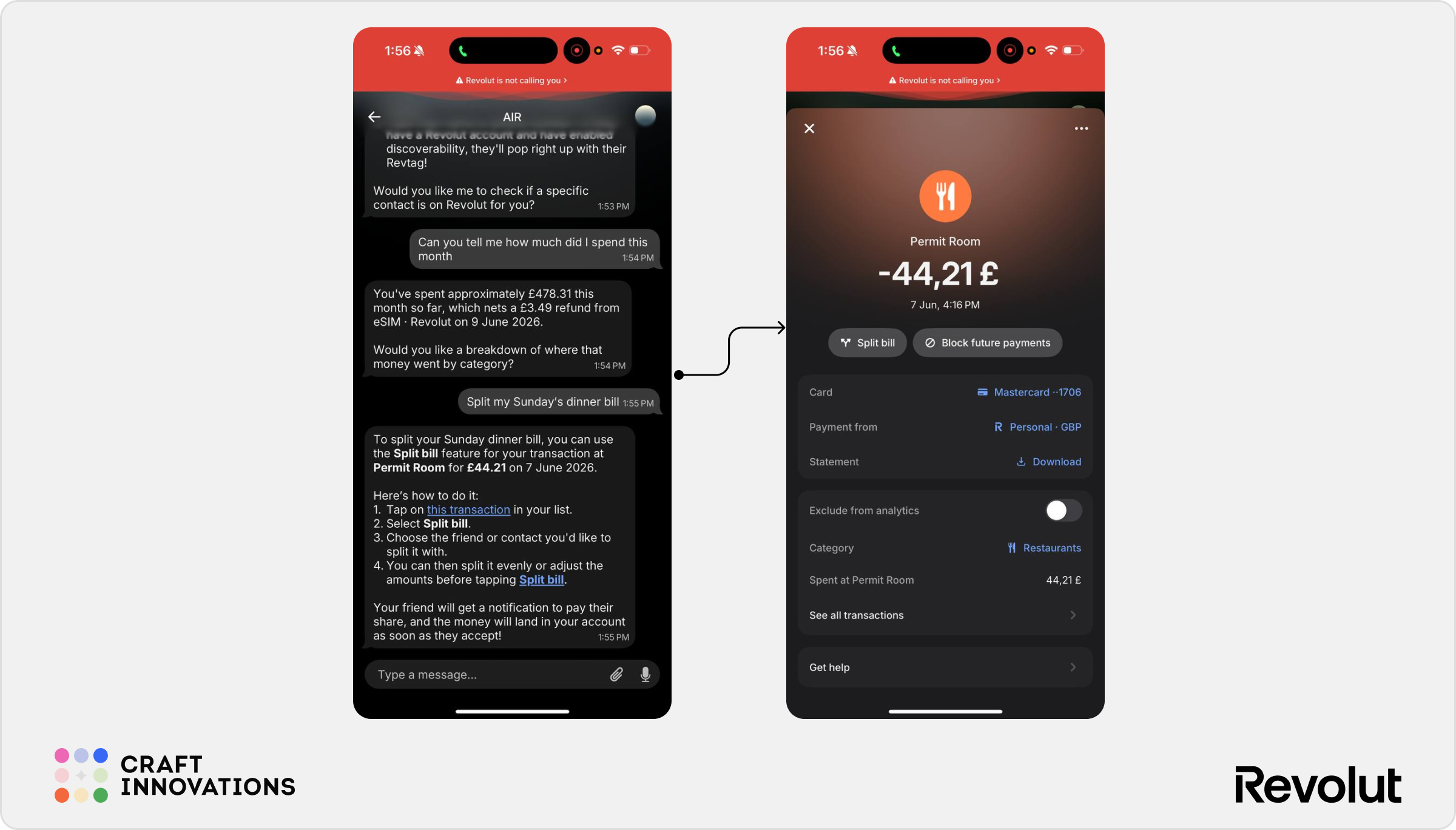
✅ Correctly identifies relevant transactions
✅ Understands bill-splitting intent
✅ Provides contextual instructions
⚠️ Does not execute the split bill flow
⚠️ Relies on existing Revolut screens to complete the task
7.3 Language Context Retention
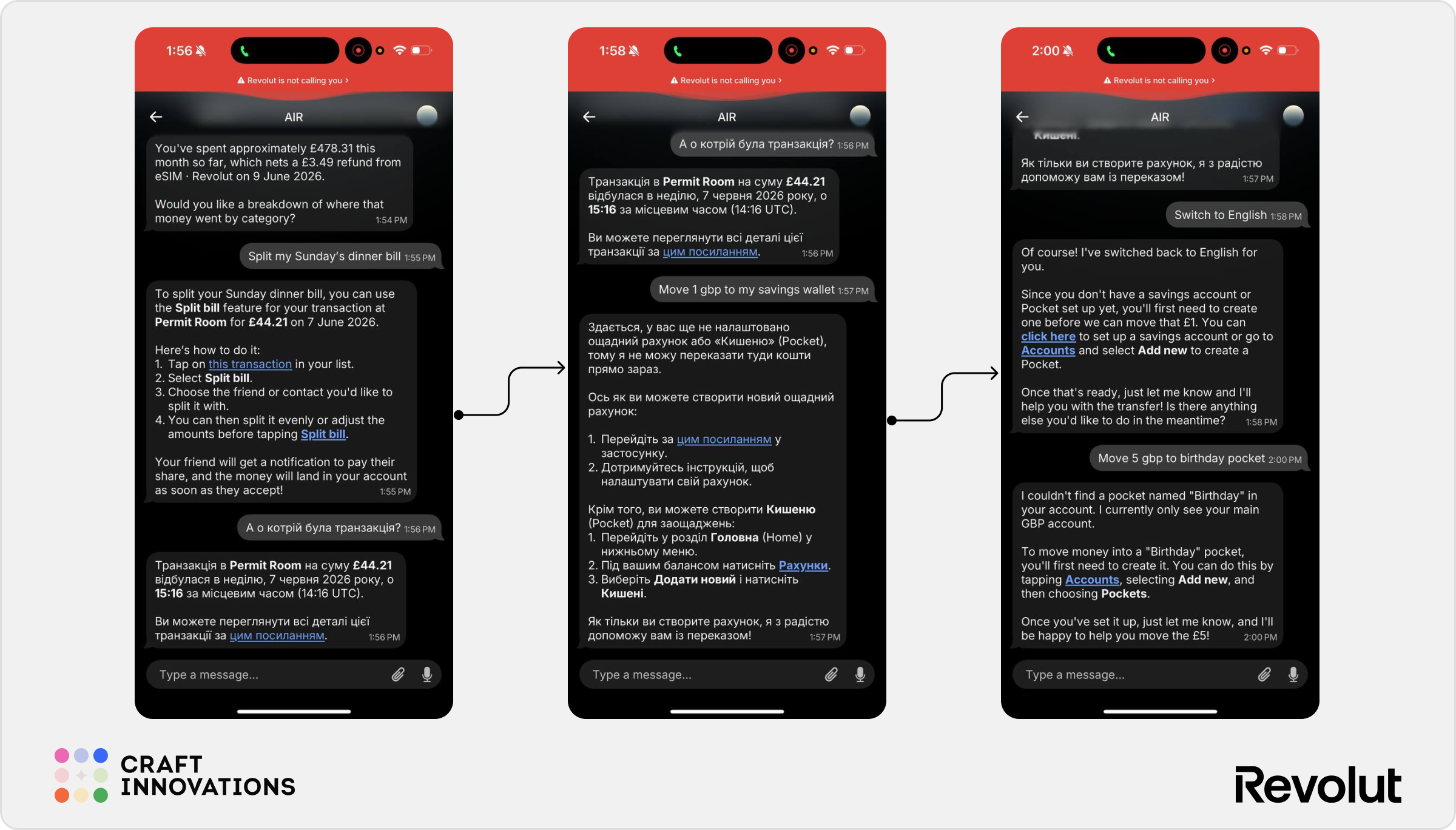
An unexpected observation emerged during testing.
Part of the conversation switched into Ukrainian.
AIR immediately adapted and continued the interaction in Ukrainian without requiring any configuration changes.
However, when the user later wanted to continue in English, the assistant did not automatically switch back. The language context remained active until the user explicitly requested:
Switch to English.
Only then did AIR return to English responses.
This behavior is understandable but it demonstrates that AIR treats language preference as persistent conversational context rather than a temporary adjustment.
✅ Supports multilingual conversations naturally
✅ Maintains language consistency
⚠️ Language context can persist longer than expected
⚠️ Requires explicit instruction to switch back
7.4 Pockets & Internal Transfers
This scenario produced one of the most frustrating outcomes observed during testing.
The goal was simple:
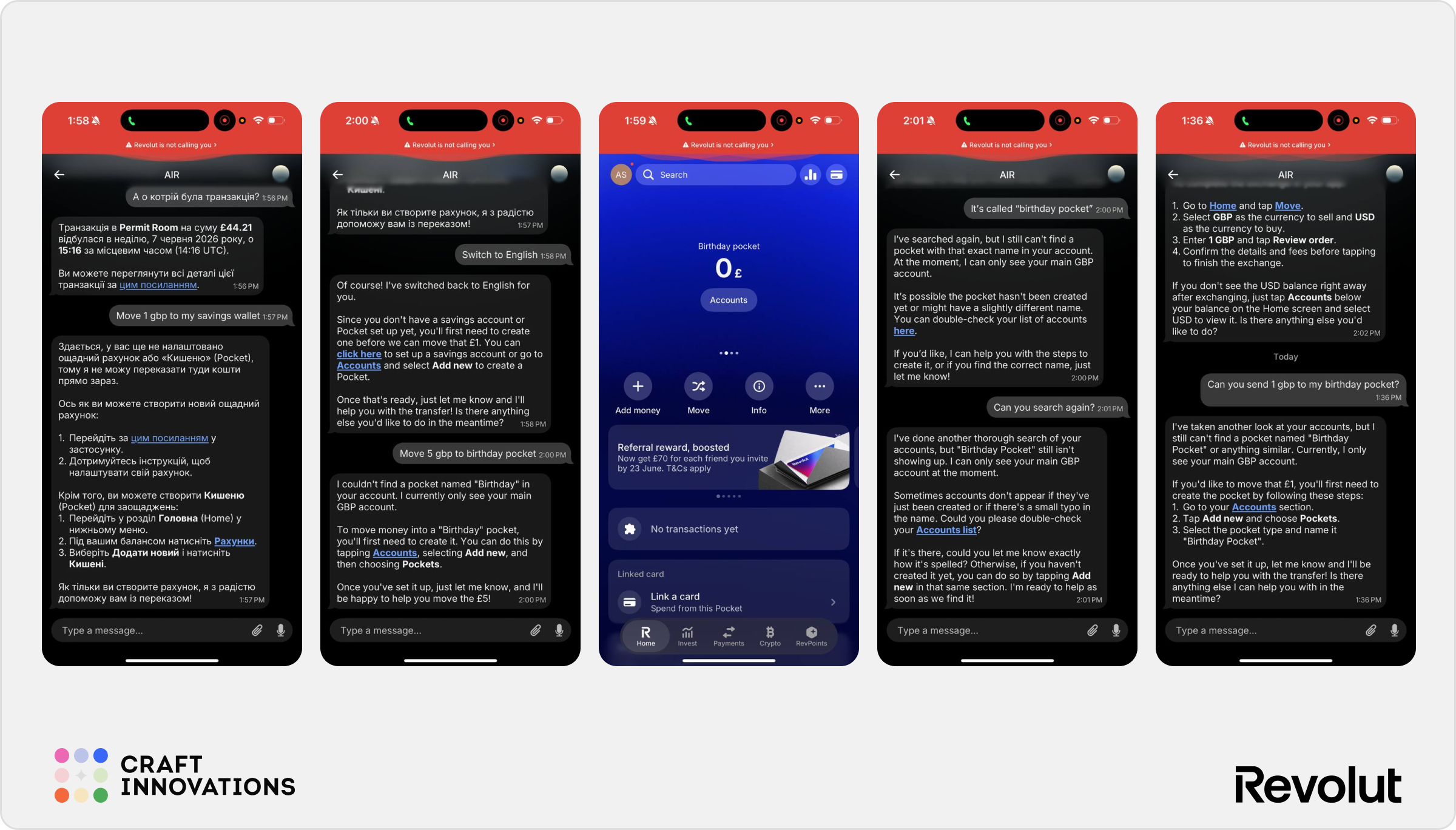
Move £1 to my Birthday Pocket.
Before creating the pocket, we intentionally referred to it using alternative banking terminology such as “Vault.”
AIR handled this extremely well.
The assistant correctly understood that the user was referring to Revolut Pockets, recognized that no such pocket existed, and provided instructions for creating one. This demonstrates semantic understanding.
The problem appeared after the pocket was created.
A new “Birthday Pocket” was added to the account and was clearly visible inside Revolut.
AIR could not find it.
We tried again later.
The assistant still could not find it.
To eliminate the possibility of indexing delays, we repeated the test approximately a day later.
The result was exactly the same.
Despite the pocket being visible in the application, AIR continued insisting that it did not exist. This was arguably one of the largest capability gaps discovered during testing. The assistant demonstrated excellent understanding of the user’s intent but failed to access information that should have been available within the same ecosystem.
✅ Strong understanding of alternative banking terminology
✅ Correctly guided pocket creation
❌ Failed to recognize a newly created pocket
❌ Failed to recognize the pocket even after significant time had passed
❌ Could not complete an internal transfer despite the destination existing
⚠️ Suggests limitations in AIR’s access to certain account structures
7.5 Currency Exchange
Currency exchange revealed another recurring AIR pattern.
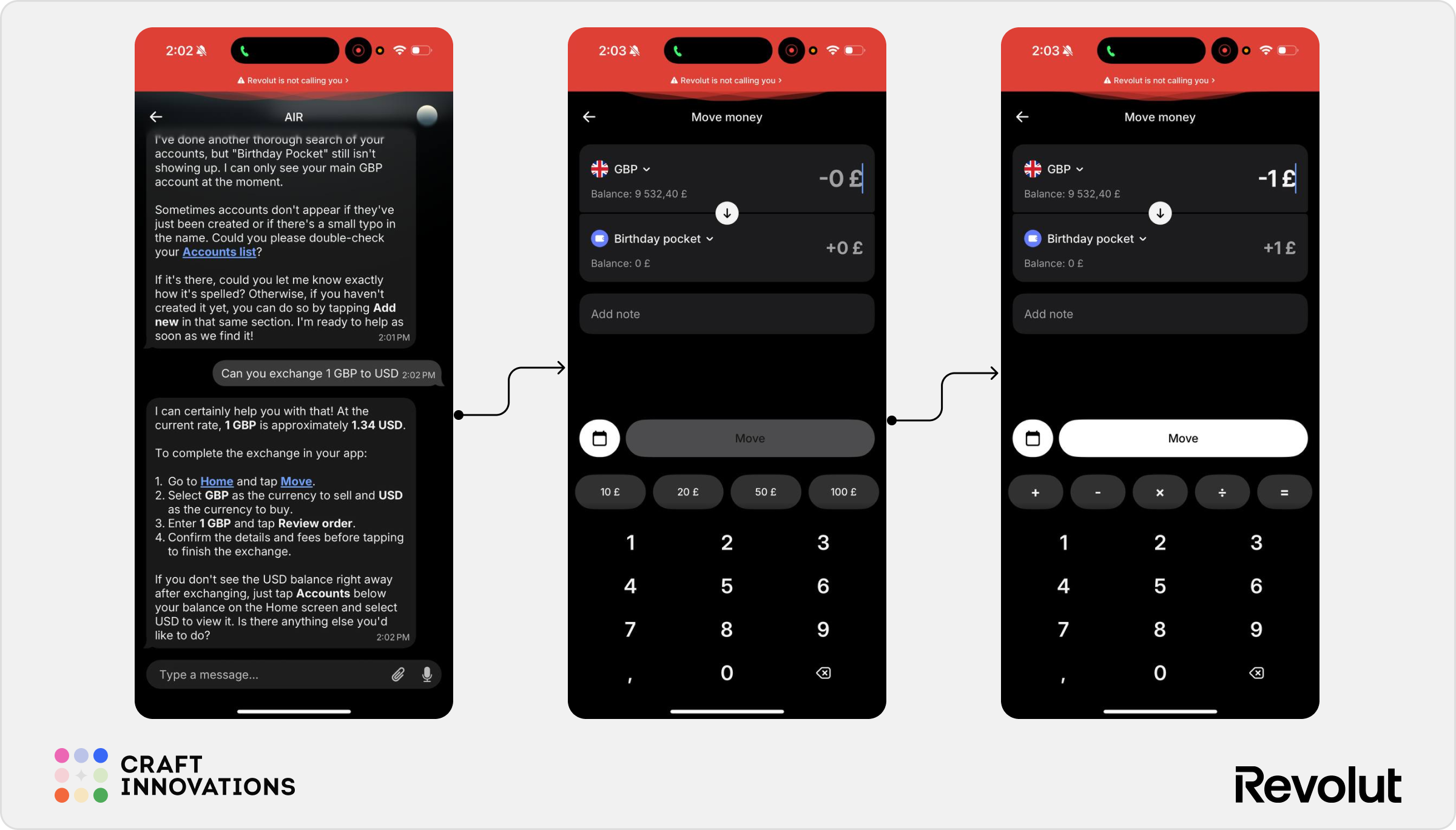
When asked:
Can you exchange 1 GBP to USD?
AIR immediately calculated the conversion and provided the current exchange rate.
However, it did not execute the exchange.
Instead, the assistant explained exactly how to complete the transaction manually inside the Revolut app, including navigation steps and confirmation requirements.
The response was accurate and useful.
But compared to the eSIM purchase flow – where AIR successfully completed the purchase and later processed a refund – the exchange scenario feels surprisingly limited.
Currency conversion is a common banking action, yet AIR currently behaves more like a guide than an execution engine.
✅ Correctly retrieves exchange rates
✅ Clear explanation of the exchange process
✅ Useful for occasional users
⚠️ No direct execution inside the chat
⚠️ Less capable than the eSIM purchase flow
AIR in Numbers
Throughout this review, we’ve focused primarily on capabilities, UX patterns, and execution quality.
But is AIR actually faster?
To answer this, we ran a series of simple comparative tests. Users completed the same task twice – first using AIR and then using the traditional Revolut interface. The goal was to understand whether conversational banking currently provides a practical efficiency advantage in everyday situations.
1. Buying an eSIM
Traditional Revolut flow: ~45 seconds; 6 taps
Open eSIM section → Select destination → Choose plan → Review details → Confirm purchase → Complete payment
AIR flow: ~50 seconds; 6 taps (incl. typing)
Open Account → Open Chats → Open AIR → Type request → Wait for processing → Select plan → Confirm purchase
2. Finding a Wizz Air Transaction
Traditional Revolut flow: ~10 seconds
Open transaction history → Search “Wizz” → Review transactions result
AIR flow: ~20 seconds
Open Account → Open Chats → Open AIR → Type request → Processing → Review result
While the total number of interactions was relatively low in AIR flow, users also had to account for typing time and AIR’s response generation process.
In practice, the AI-assisted flow was not faster. AIR created a more conversational and guided experience but not a more efficient one.
For straightforward transactional tasks, traditional navigation still holds a speed advantage.
Sad but true
At first glance, AIR appears capable of handling transaction search well. However, this test revealed something unexpected. When asked:
Find all my Wizz Air transactions.
AIR initially returned only a single transaction, while a manual search inside Revolut immediately revealed multiple Wizz Air transactions across different dates.
Only after a follow-up question AIR surfaced the remaining results.
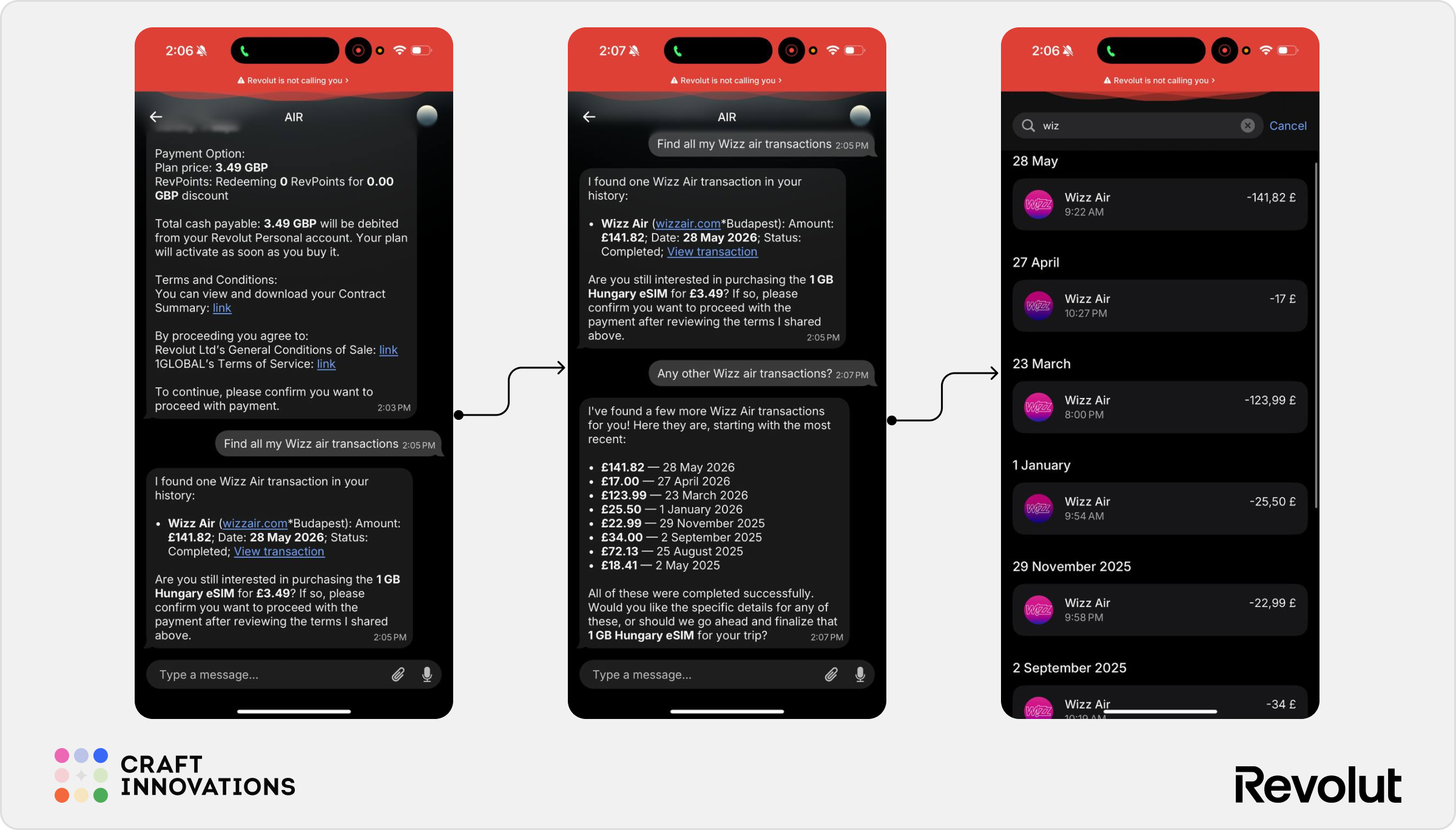
This is a particularly important finding because transaction search is one of AIR’s strongest advertised use cases. Users generally trust financial assistants to return all relevant results when asked for transaction history. Missing transactions can create uncertainty and force users to manually verify the output anyway.
❌ Failed to return all matching transactions in the first response
❌ Required additional prompting to retrieve complete results
❌ Created unnecessary verification effort
⚠️ Potential trust issue for financial search scenarios
Exploratory Use Cases
The scenarios covered in this expert UX review focused on the official use cases. But real users rarely follow product demos. They make typos, ask multiple things at once, switch topics, upload files, seek financial advice, and occasionally try to break the system.
That’s why we conducted a second round of testing focused on exploratory and edge-case scenarios. The full report includes 100+ additional screenshots and findings covering:
- Conversational language and typo handling
- Multi-intent requests and complex instructions
- Investment advice and regulatory boundaries
- Security and biometric-related scenarios
- Multi-banking and external account questions
- Voice commands
- File and attachment handling
- Humor, sarcasm, and informal language
- Context switching and memory retention
- AI reliability and failure scenarios
So, is AIR really better than traditional navigation?
AIR clearly feels like a first-generation product but that is not a criticism. While most banks are still experimenting with AI behind the scenes, Revolut has put an AI assistant directly into the hands of millions of users and allowed it to interact with real financial products.
And that matters. Innovation in banking rarely comes from waiting until everything is perfect. It comes from shipping, learning, and improving.
AIR works best when the user does not know where to go. It is useful for feature discovery, hard-to-find settings, and scenarios where the navigation slows users down.
In these cases, AIR reduces cognitive effort. The user can describe the goal instead of searching through menus.
For routine actions, the value is less convincing.
If a user already knows where something is, the standard Revolut interface is often faster. Typing a prompt, waiting for AIR to process it, and reading a generated answer can take longer than tapping through a familiar flow. AIR often feels smarter than navigation but not always faster.
The biggest concern is reliability of data.
The Wizz Air transaction test showed that AIR can miss relevant results even when those transactions clearly exist in the account history. This raises a broader question: if the assistant misses transactions in search, how much should users trust its financial summaries? For now, important outputs still need verification.
Another open question remains: whether conversational banking will prove efficient enough to justify the growing computational costs associated with AI.
Our final takeaway comes from one of the users who participated in the testing:
I would use it from time to time, especially for simple actions like buying an eSIM. For me, it’s a trusted feature because I trust and love Revolut!
That quote captures something important. Customer Loyalty is one of the hardest things to earn in financial services, and Revolut has spent years building it with its customers. AIR still has room to grow but it already benefits from that foundation.

