
What once felt intuitive now feels clunky. A KYC process designed 2 years ago doesn’t match today’s customer expectations. A premium feature hides behind three clicks. UX copy written during the MVP phase no longer speaks the user’s language.
And it’s not because the product stopped working. It’s because the context changed – but the experience didn’t.
User experience – overall experience a customer or user has when interacting with a product, system or service, mostly through digital touch-points.
In fintech, that means mobile apps, web banking platforms, and customer support channels. While the customer value proposition itself may sit slightly outside the interface, it’s still delivered through those same digital flows. Whether it’s banking, SaaS, insurance, or investment apps, what matters is how clearly value is communicated – and how easily users can act on it through mobile or web.

That’s why newer challengers win. They enter the market with cleaner onboarding, clearer navigation, and simpler mobile experiences. Companies like Nubank, Revolut, Wealthsimple, Monzo, and Monobank didn’t just grow by offering better interest rates – they designed better digital journeys that felt easier, faster, and more trustworthy.

This article focuses on usability in fintech – specifically how UX impacts key product metrics across the entire customer lifecycle. You’ll learn what stages fintech users go through, which metrics matter at each step, and how usability testing builds UX-driven growth.
While the focus is on fintech, the same principles apply to any digital product with complex user flows.
1. Discovery & Consideration
The customer journey starts with discovery. At this stage, users are exploring options – whether it’s opening a new bank account, finding an investment platform, or researching insurance or wealth management providers. They’re not committed yet, but they’re evaluating who looks trustworthy, easy to understand, and worth trying.

From a product metrics perspective, two indicators matter most here:
- Conversion rate – how many visitors take the next step (e.g. start an application)
- Customer acquisition cost (CAC) – how much you spend to get someone to that point
But these numbers don’t just depend on ads or offers. They’re heavily influenced by usability – especially on mobile, where the majority of traffic lands first.
So we talked about the metrics – now let’s look at typical UX problems that directly influence them:
- Poor first impression: Visual design feels outdated and information is hard to scan. Users land and leave before doing anything.
- Too technical UX copy: Value is hidden behind complex financial terms so users can’t understand the conditions.
- Unclear next steps: Visitors don’t know how to apply, what makes them eligible, or where to go next.
- No clear value proposition: You offer something useful – but the way it’s presented doesn’t resonate with customer needs.
- Poor mobile experience: Most users discover you via social ads – in some segments, up to 80% of traffic lands on mobile first. If the app loads slowly, breaks visually, or confuses them in the first tap – you’ve lost them.
These issues might seem minor, but they compound quickly. And with each lost visit, your CAC goes up and your conversion rate drops.
2. Onboarding
A smooth onboarding turns a curious visitor into an active user. This is where they complete identity verification (KYC), set up an account, and (ideally) make their first transaction. In fintech, onboarding often includes regulated processes and compliance steps, which can vary by region.

Product metrics to watch:
- Onboarding completion rate – how many users actually finish the sign-up process
- First transaction rate – how many go on to make their first meaningful action (like transferring money, adding funds, or activating a card)
Common usability blockers at this stage include:
- Complex KYC: Unclear ID requirements and multiple steps cause friction – especially when not adapted to regional norms. In the UK, onboarding might take 5+ minutes; in Nigeria, it’s often under 20 seconds – can be like inside the system and all other documents you can upload later.
- Lengthy forms: Endless input fields with no clear progress indicator often cause drop-offs. If the user doesn’t know how much is left, they’re more likely to abandon the process.
- Unclear process: Many users don’t know what’s coming next – how many steps remain, what documents are needed, or how long it will take. That uncertainty kills momentum.
- Mobile UX friction: If your onboarding isn’t designed for mobile-first interactions, expect high abandonment. A small glitch or poor layout on mobile can make users give up before ever activating.
At this stage, the stakes are high. Users are interested enough to start – so turn that interest into momentum.
3. Daily banking
Once users are onboarded, they shift into daily operations – the core experience of any banking or finance app. This is where they manage their money: send transfers, pay bills, check balances, move funds between accounts, or track spending. For most users, this becomes their primary interaction with your product. So be careful – the app might be “functional,” but if daily tasks are frustrating, users start looking elsewhere.

Key activities at this stage:
- Money transfer
- Card management
- Deposits
- Currency exchange
- Bill payments
- Personal finance management (PFM)
At this stage, two metrics reflect how well the product serves real-life usage:
- Transaction volume – how much activity your users generate
- Transaction frequency – how often they come back to perform those actions
These metrics are often top of mind for product teams – because they indicate whether users actually rely on your app in their daily financial lives.
So what usually gets in the way?
- Friction in transfers & payments: If sending or receiving money involves delays, errors, or multiple steps, users quickly lose trust.
- Pending transactions: Users see a number, but it’s not up to date. They don’t know their exact balance – and that makes budget planning impossible.
- Poor navigation: Core actions (like topping up, exchanging currency, or paying bills) are hidden behind too many screens or buried in menus.
- Overly aggressive timeouts: Users get logged out too fast – even if they were mid-task. It disrupts flow and creates unnecessary frustration.
Daily banking isn’t just a feature set – let your customers manage their money quickly and confidently.
4. Advanced products
Beyond daily banking, many financial platforms offer advanced features – things like credit, “Buy Now, Pay Later” (BNPL), trading, wealth management, insurance, or premium banking. These products aren’t part of the core experience but often drive additional revenue.

At this stage, the focus shifts to engagement metrics like:
- Feature adoption rate – percentage of users who engage with advanced products
- Conversion to paid services – how many go from browsing to buying
So what gets in the way?
- Poor feature discoverability: New services are hard to find or not surfaced contextually. Many users simply don’t know they exist.
- Hidden fees or unclear pricing: If costs aren’t transparent, users avoid engaging altogether.
- No onboarding for new features: Advanced tools are just… there. No guidance, no prompts, no microcopy. Users don’t know how or why to use them.
- Complex UX copy: The terminology doesn’t match what users expect. They get lost before they ever start.
In our experience, only 20–25% of mobile app users engage with advanced features. Most users never even discover them. In many banking apps, the core tools sit front and center, while the rest are hidden in menus or buried under vague labels. After a few years on the market, product portfolios grow – but visibility doesn’t keep up.
5. Support
Even with the best-designed product, users will need support. In fintech, that usually means live chat, contact centers, email requests, or even in-branch interactions if there’s a physical presence. Ideally, users wouldn’t need to reach out at all – but when they do, the experience should be enjoyable.
Many businesses are turning to AI to cut customer support costs – and it can work. But for users, it’s unsettling when they don’t know who (or what) they’re talking to.

Two metrics matter most here:
- Ticket volume – how many issues users raise
- Branch traffic – how often they bypass digital to solve problems in person
Both can spike when users can’t complete tasks on their own – often due to unclear UX or missing system feedback.
So what’s going wrong?
- Missing system feedback: The interface doesn’t explain what’s happening – no confirmation, no status messages, no inline guidance. Users turn to support because the system left them guessing.
- No clear distinction between chatbot vs. live agent: Users don’t know who they’re talking to or how to escalate.
- Long response time / no status visibility: Users wait too long or never see progress. They’re stuck in limbo, unsure if anyone is handling their request.
- Fragmented support channels: A user starts a chat, then calls – and the agent has no context. Conversations don’t carry over between channels, forcing customers to repeat themselves.
Good support doesn’t just solve problems – it earns loyalty. Make it easy, fast, and human.
6. Leave
Sometimes users decide to leave – and that’s still part of the customer journey. Whether it’s closing an account, withdrawing funds, or stepping away temporarily, offboarding is a real experience, and it deserves the same UX attention as onboarding.
Handled well, this stage can leave a positive final impression and keep the door open for future return. Handled poorly, it creates frustration, brand damage, and permanent churn.

Product metrics to watch:
- Retention rate – how well you keep customers over time, even when they’re ready to go
- Reactivation potential – not always tracked, but closely tied to the offboarding experience
Here’s what often goes wrong:
- Hard barriers to migrate: The account closure process is hidden, overly complex, or filled with unnecessary steps.
- No option to download historical data: Users can’t export their statements or transaction history.
- Unclear status of pending transactions: At the moment of closure, users aren’t sure what’s still processing, what’s finalized, or what will happen to scheduled transfers.
Offboarding is the last moment to leave a good impression. Let people go with clarity and respect, and they’re far more likely to come back.
Key Approaches to Improving UX
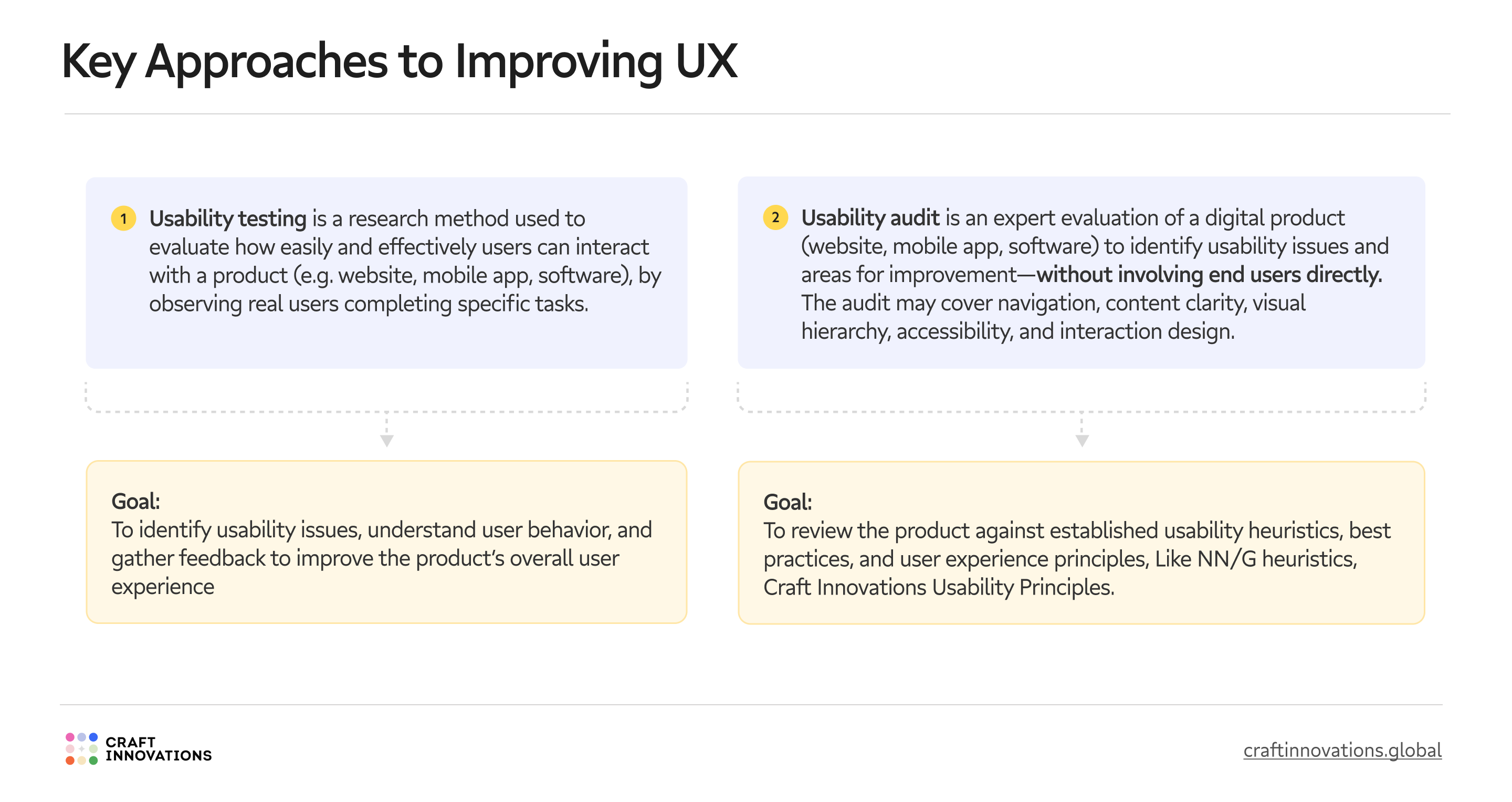
As we’ve seen, usability directly affects your product metrics. So how do you actually improve it? Two core methods stand out: Usability Testing and Usability Audit.

Usability Testing
A hands-on research method where real users try to complete real-world tasks and scenarios in your app or prototype. It shows you where they get stuck, what frustrates them, and how they behave in context.
Goal: To identify usability issues, understand user behavior, and gather feedback from real users to improve the overall product experience.
Common outcomes:
- Drop-off moments in key flows
- Misunderstood labels or content
- Unexpected user behaviors
- Gaps between intent and action
Usability Audit
An expert-led evaluation of your digital product (live or prototype) that doesn’t require involving end users. Instead, auditors assess your interface against UX heuristics, best practices, and accessibility standards.
Goal: To spot usability issues by comparing your UI to principles like NN/g heuristics or Craft Innovations Usability Principles.
What’s evaluated:
- Navigation and flow
- Content clarity and consistency
- Visual hierarchy and structure
- Error prevention and system feedback
- Accessibility barriers
These methods work well together – one gives you direct input from real users, the other benchmarks your design against established best practices. A proactive mix of audits and testing will help you spot weak spots.
If you want to dive deeper into how usability testing actually works – what methods exist, when to use each one, and how to quantify results with metrics like SUM – we’ve covered it all in this dedicated guide “Types of Usability Testing: Which Method Is Best for Fintech Products”.
When to Test Usability?
So – when exactly should you test usability? In our work with fintech products, we usually split it into three key stages:

1. Early-stage prototypes or product concepts
This is when your product exists as a low-fidelity prototype – no final design, just rough flows and basic screens. The goal here isn’t polish. It’s clarity.
We test:
- Informational structure – can users make sense of the layout?
- Perception of core features – what do they think the product actually does?
- Navigation and user flows – can they complete basic tasks?
- User expectations – what do they hope will happen next?
2. Pre-development stage
At this point, your design and copy are close to final. You’re almost ready to hand things off to development – but want to catch problems before they cost time and money.
This is where fintech teams (especially banks) focus most. Around 60% of the usability tests we run happen here.
We test:
- Detailed informational structure and corner cases
- Navigation and real-life flows
- UX copy – how well messages land
- Expectations – does the flow match what users need?
3. Market stage
Once the product is live, usability testing doesn’t stop. Now, the focus shifts from potential confusion to real frictions that affect product metrics.
We test:
- UX blockers that influence KPIs (conversion, retention, etc.)
- Gaps in user journeys
- UX copy and UI clarity
- Customer effort and satisfaction
- Assumptions that no longer match user behavior
Grab the Usability Cheat Sheet
Working on a fintech product and not sure which usability testing method fits best? Moderated or unmoderated? Early concept or live feature?
Whether you’re testing onboarding, transactions, or compliance flows – this free checklist maps 20 fintech-specific use cases to the most effective usability testing methods.
Here’s a quick preview. Want the full version with 20+ mapped cases? Get access to the “Best Usability Testing Methods for Fintech”


